Mason Cheat for Albion Online
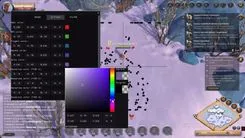
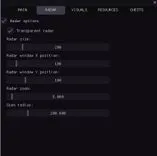
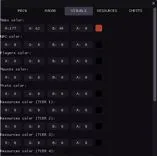
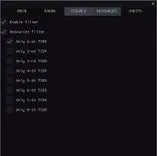
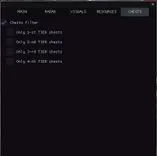
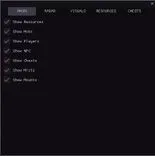
Mason is a tool for Albion Online that provides an informational overlay showing resources, mobs, NPCs, players, mounts, chests, and mist locations within the game world. It includes a customizable radar with adjustable size, transparency, position, zoom, and detection radius. The overlay supports custom colors for all object types, including resource tiers from T1 to T8, and offers filtering options to display only selected tiers for more focused in-game navigation.
Status:
undetected
Compatibility:
- Windows
- 102004-22h2(all)
- Processor
- Intel/AMD
- Graphics card
- Nvidia / AMD
- Spoofer
- No built-in/Choose spoofer
Note
- Supported game version: Official client / Steam
- Supported game mode: Windowed or Windowless
- Support for invisibility in videos or screenshots: None
List of Hack Features
Main
- Show Resources / Display resources (wood, stone, ore, etc.)
- Show Mobs / Display mobs
- Show Players / Display players
- Show NPC / Display NPCs
- Show Chests / Display chests
- Show Mists / Display myst
- Show Mounts / Display mounts
- Counter of objects of each type / Displays the number of objects of each type on the radar, broken down by type (CHEST, MOB, HARV, etc.)
- Minimum / maximum distance for display / Filtering objects by distance, objects outside the range are not displayed
- Sound notifications / Sound alerts when detecting various types of objects (players, chests, resources)
- Tracking the nearest object / Automatically detects and displays information about the nearest object to the player
- Export coordinates to a file / Saves the coordinates of all detected objects to a text file (hotkey: F3)
- History of discovered objects / Tracks the history of object detection with timestamps
- Hotkeys / Quick access to functions: F1 (menu), F2 (save), F3 (export coordinates)
- Automatic configuration saving / Automatically saves settings every 30 seconds
- Displaying the distance to objects / Shows the distance in meters to each object on the radar
- Player approaching warning / Sound warning when other players are approaching at a certain distance
- Grouping objects by type / Groups objects by type for easy analysis
- Direction indicator / Shows the direction on the radar
- Automatic hiding of distant objects / Automatically hides objects outside the scanning radius
- Detection time statistics / Tracks object detection statistics (time of first / last detection, number of detections)
- Improved sound notifications / Different sounds for different types of objects (chests, resources, players)
- Visual indicators / Pulsating circles for important objects (chests, artifacts)
- Object Priority System / Prioritizing objects for sorting (chests are the highest priority)
- Object caching / Object caching for performance optimization
Radar
- Radar options
- Transparent radar / Set the transparency of the radar
- Radar size / Set the size of the radar
- Radar X position / Set the position of the radar on the X-axis
- Radar Y position / Set the position of the radar on the Y-axis
- Radar zoom / Set the proximity and distance of the radar
- Scan radius / Set the object scanning radius
Visuals / Colors
- Mobs color / Set the mob display color
- NPC color / Set the NPC display color
- Players color / Set the display color for players
- Mounts color / Set the display color of mounts
- Mists / Set the mists display color
- Resources TIER 1 color / Set the display color for level 1 resources
- Resources TIER 2 color / Set the display color for level 2 resources
- Resources TIER 3 color / Set the display color for level 3 resources
- Resources TIER 4 color / Set the display color for level 4 resources
- Resources TIER 5 color / Set the display color for level 5 resources
- Resources TIER 6 color / Set the display color for level 6 resources
- Resources TIER 7 color / Set the display color for level 7 resources
- Resources TIER 8 color / Set the display color for level 8 resources
- Chests color / Set the chests display color
Recources
- Only 1-st TIER items / Display items of the 1st level (dash)
- Only 2-st TIER items / Display items of the 2nd level (dash)
- Only 3-st TIER items / Display items of the 3rd level (dash)
- Only 4-st TIER items / Display items of the 4th level (dash)
- Only 5-st TIER items / Display items of the 5th level (dash)
- Only 6-st TIER items / Display items of level 6 (dash)
- Only 7-st TIER items / Display items of the 7th level (dash)
- Only 8-st TIER items / Display items of the 8th level (dash)
Chests
- Only 1-st TIER chests / Display chests of the 1st level (tier)
- Only 2-st TIER chests / Display chests of the 2nd level (tier)
- Only 3-st TIER chests / Display Level 3 chests (tiers)
- Only 4-st TIER chests / Display chests of the 4th level (tier)
Visual Effects
- Lines to objects / Draws lines from the center of the radar to each object for better visualization
- Trajectories of movement / Displays tracks of movement of objects with a configurable length
- Visibility zones / Visualizes the scanning area
- Color gradients / Gradient coloring of objects
- Object animations / Pulsing effects for objects with a configurable speed
- Shadows / Shadows under objects to create a depth effect
- Glow effects / Glow around objects
- Radar grid / Coordinate grid for better orientation
- Zone boundaries / Visual borders of the radar with corner markers
- Directional arrows / Arrows that show the direction to objects
- Object icons / Unique icons for different types of objects
- Gradient lines / Lines with a smooth color transition from start to end
- Contours of objects / Contours around objects with a custom thickness
- Hover highlight / Highlight objects when you hover the mouse over them
- Distance rings / Concentric rings for visualizing distances
- Particle effects / Particles around important objects (chests, artifacts)
- Visual markers / Asterisks for important items (chests, artifacts)
- Pulsating effects
- 3D depth effect / Depth effect for objects