

Arcane Cheat for Wardogs
How to install and launch
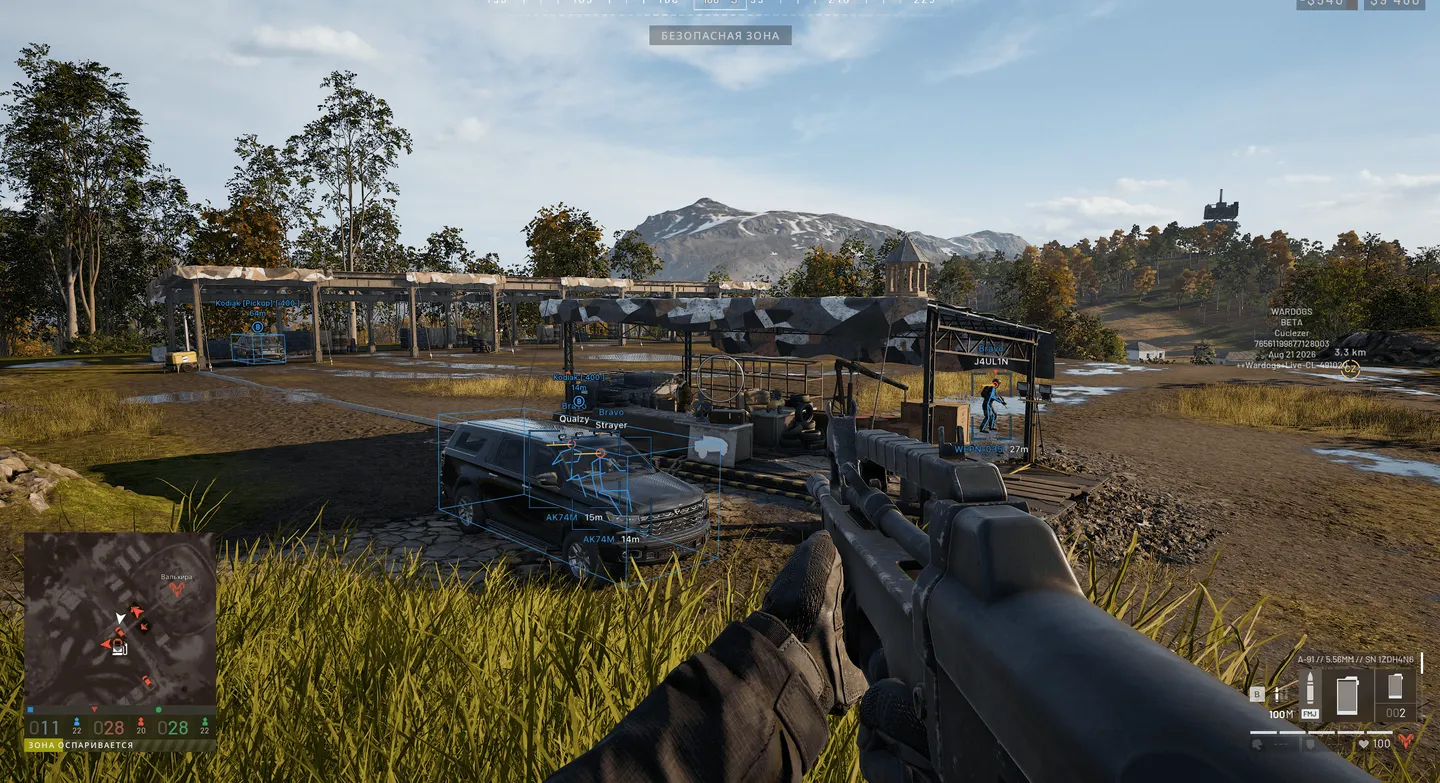
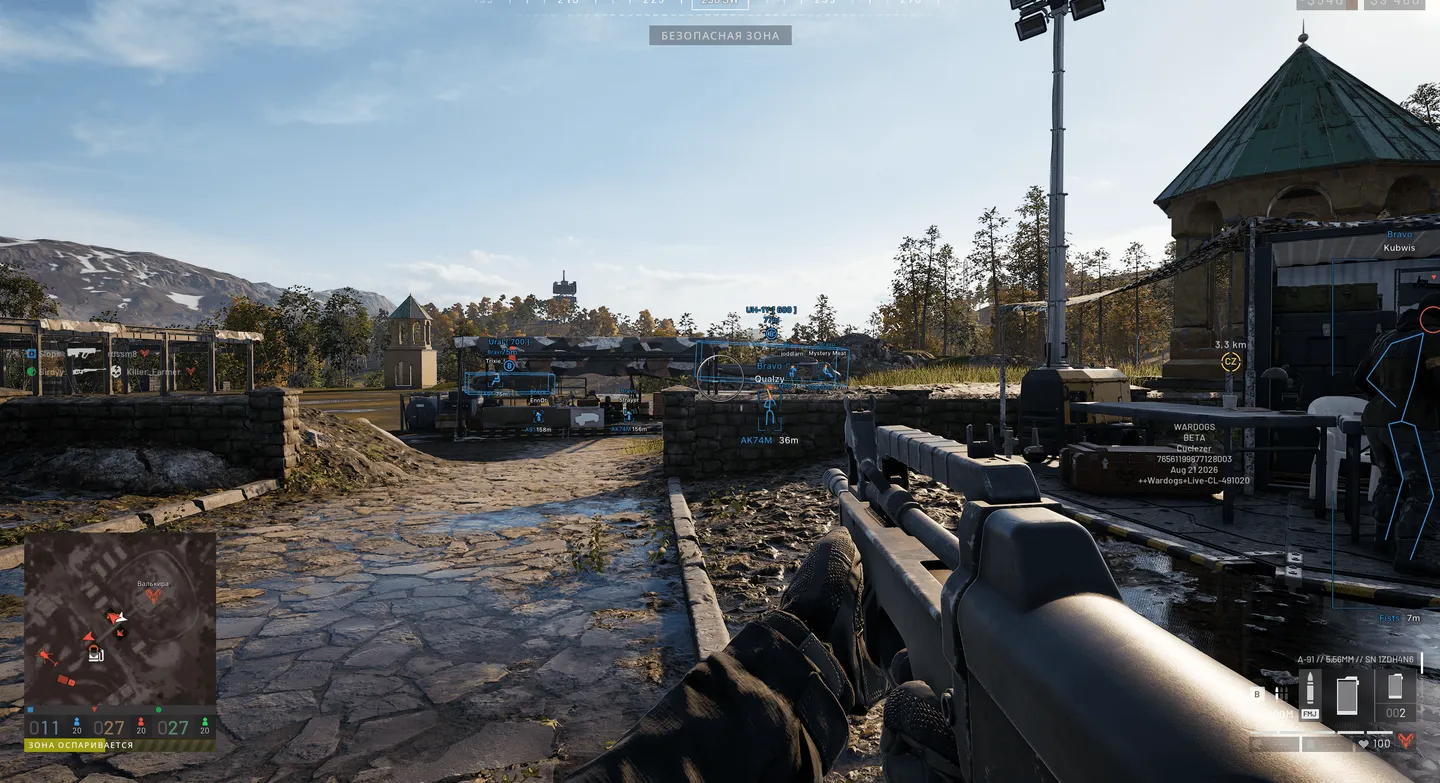
Arcane is a Wardogs cheat for players who want a pSilent aimbot and help on the mortar and the SPH-2 howitzer in the same menu. For pSilent there are two modes, Old and New, with their own hit chance, and Teleport bullet sits next to it. The mortar assistant fires only at your own map markers, shows barrel spread in metres and averages its correction over your shots. Place a new marker and the barrel swings to the firing solution while the mouse stays yours. On the howitzer, auto aim corrects for hull slope and keeps adjusting for up to 3 seconds until the barrel is on target. Shell trajectory works even with both helpers off. For your and enemy shells you see the remaining flight path, the impact point with damage radius and where the shell is right now. Look Alert lists every enemy whose line of sight crosses your body at this moment, nearest first. In BattleMode you can hide that alert and Glow too. The artillery helper covers only the SPH-2, and loot is thin, with a single toggle for dropped items and no categories. No Weight is still in the list, but the developer has temporarily removed it.
- Windows
- 10(all)/11(all)
- Processor
- All
- Graphics card
- Nvidia/AMD
- Launchers
- Steam
- Spoofer
- No built-in/Choose spoofer
List of Hack Features
Aimbot
- Enable
- pSilent mode: Old, New
- Hit Chance for pSilent and Silent
- Teleport bullet mode
- Prediction
- Mortar fire assistant: aims only at your own map markers, shows the barrel's spread in metres, averages its aim correction over your shots
- Mortar helper Auto aim at marker: when you place a new marker, the barrel turns to the firing solution by itself while the mouse stays yours
- First keybind
- Second keybind
- Target: Players, BOTs, Teams, Knocked
- Goes for the target with the lowest HP
- Find bone type: Selected bone, Closest bone, Random bone
- Bones selected: Head, Neck, Chest, Body
- Bone freeze
- Bone switch delay
- Target switch delay
- Dead zone
- Humanize
- FOV Size
- Smoothness
- Draw FOV Circle
- Draw FOV Background
- Draw target marker
- Max distance
- Visibility check, including Perfect Visibility Check
- No recoil
- No spread
- No sway
Triggerbot
- Fire mode: Single, Hold
- Activation: by keybind or always on
- Extra targets: bots, teammates, knocked players
- Hit zone: Any, Head, Head and body
- Max distance
- Visibility check
- Reaction delay
- Cooldown
- Hold time
- Off-target grace
Players ESP
- Bounding box: Box, Corner
- Fill box: Static, Gradient
- Glow: Visibility check, Aura, Chrome, Chrome check, Thermal, Hologram, Ice
- Glow colours: separate for the visible zone and the zone behind walls
- Skeleton: head circle, thickness
- View line: start colour, end colour
- Line to enemy: colour, position
- Game nickname
- Team name
- Weapon in hands
- Distance
- Team colors
- Mortar operator highlight: own colour, own max distance
- Draw knocked players
- Visibility check, with Perfect Visibility Check for the skeleton and 2D box
- Max distance
World ESP
- Show distance
- Show dropped items
- Supply: supply crate, armoured crate, build pallet, supply depot
- Supply 3D box with a colour per type and distance
- Vehicles: 17 ground, 7 air
- New vehicles: Lonestar, Manticore, Valkyra with their spawns
- Vehicle 3D box: black outline, red front side to show facing, covers turrets and roof machine guns
- Buildings and Fortifications: separate lists, each with Enable all / Disable all
- Projectiles: heavy, mortar, artillery and others
- Shell trajectory: remaining flight path, impact point with damage radius and current shell position for your and enemy mortar and artillery shells, colour per type, works without the aim helpers
- Bullet tracers in Projectiles: your own bullets leave a trail from the muzzle to the impact point that fades out over the set time
- Offscreen indicators
- Tracer modes: Static, Rainbow, Hit (hits on players and bots in a separate Hit color)
- Fullbright
- Tracer settings: duration 0.5–10 s, thickness, transparency; hidden by BattleMode together with projectiles
- FOV Changer
- Super Zoom
- Unlimited Zoom for the scope
Radar
- In-game radar: all players and objects
- Minimap
- Supply markers: colour per type, name, distance, off-screen
- Mortar operator marker: own colour, name, distance, off-screen, allies shown
- Mortar operator colour on the minimap and the tactical map
- Customizable display
Look Alert
- Flags enemies whose line of sight passes through your body right now, players and bots alike
- List window: name, distance and a direction arrow for each, nearest first
- Text above box: Looking at you over the ESP box
- Offscreen arrows with a Looking at you label, even when the regular Offscreen arrows are off
- Radar: a warning colour, and the marker stays pinned to the radar edge when out of range
- Separate toggle and colour for each of these displays
- Visibility check
- Max distance
Artillery Helper
- For the SPH-2 howitzer, switched on separately from the mortar fire assistant
- Target set with a mark on the map
- Aiming guide: how far to turn left or right and how far to raise or lower the barrel
- Fire on target prompt plus a red firing cross in the middle of the sight once the aim is right
- Accounts for hull tilt on slopes and the barrel's angle limits
- Auto aim at marker: aims at the marker with correction for hull slope, adjusting for up to 3 seconds until the barrel is on target
- Show details: distance, flight time, miss with the current aim, barrel spread, loaded shell
- Mark target: the mark drawn on screen, with an arrow by the sight when it is off-screen
- Auto mini-game: plays the arrow mini-game during reload for you
Misc
- No Weight: sprint and full movement speed with any loadout, Super Heavy included (temporarily removed by the developer)
- Infinite Breath: holding your breath while aiming never runs out
- Freecam: fly the camera freely, toggle key (F6 by default), adjustable flight speed and Shift boost
- Weapon offset: move the first-person weapon model forward, right and up (in cm) to get the gun out of the view or stop it sticking into the screen
Settings
- Menu keybind
- Unload keybind
- DPI Scale
- VSync
- Theme
- Watermark
- Language
- BattleMode: can also hide Glow and Look Alert
Configs
- Create
- Get shared
- Launch
- Save
- Edit name
- Share
- Remove
The developer may change the program's functionality at any time, but we always do our best to keep this information up to date


