Mason full Cheat for Apex Legends
Mason Apex Legends cheat combines precise aim assistance with extensive visual awareness tools for improved control during combat. The aimbot activates only with a selected key and can be fine-tuned by radius, smoothness, and target bone, along with automatic switching between enemies in range. ESP visuals highlight players and ground loot such as weapons, armor, ammo, and other equipment, with rarity filtering to reduce clutter. Extra features include recoil reduction and versatile configuration management, such as quick hiding, battle-only display mode, and clipboard-based config saving. The software is continuously updated to maintain stable and up-to-date functionality.
- Windows
- 102004-26h1/112004-26h1
- Processor
- Intel/AMD
- Graphics card
- Nvidia / AMD
- Spoofer
- No built-in/Choose spoofer
- Supported version of the game: Steam
- Supported game mode: Windowed / Full-screen in a window
- Support for invisibility in videos or screenshots: Yes
- USB Flash Required
List of Hack Features
Aimbot
- Tab enabled / Enable Aimbot
- Aim key / Set activation key
- Aim radius / Set the raidus of the aimbot operation
- Aim smooth / Set the smoothness of the aimbot
- Aim spot / Set a body part for targeting the aimbot
- Auto switch / Automatically switch to the next target within the aimbot radius
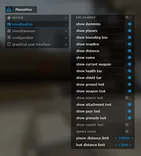
Visualization
- Tab enabled / Enable functions
- Show players / Display players
- Show dummies
- Show bounding box / Displaying a square on the opponent
- Show snapline / Display lines to the enemy
- Show health bar / Displaying the enemy's health
- Show shield bar / Display the enemy's shield
- Show name / Display the name of the enemy class
- Show weapon / Display enemy weapons
- Show distance / Display the distance to the enemy
- Show ground loot / Display loot
- Show loot name key / Set the key to display the loot name
- Show weapon loot / Display selected weapons
- Show ammo loot / Display selected cartridges
- Show attachment loot / Display selected weapon accessories
- Show gear loot / Display selected armor
- Show grenade loot / Display hand-picked grenades
- Show supply loot / Display first aid kits and shields
- Ignore team / Don't display teammates
- Player distance limit / Set a limit on the display distance of players
- Loot distance limit / Set the limit of the item display distance
- Minimal loot rarity / Allows you to filter out loot by rarity (common, rare, epic)
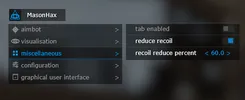
Miscellaneous
- Tab enabled / Enable functions
- Reduce recoil
- Recoil reduce percentage
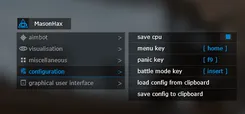
Configuration
- Save cpu / Save CPU resources
- Menu key / Set the cheat menu power key
- Panic key / Allows you to turn off the cheat immediately
- Battle mode key / Button to enable player-only display mode
- Load config from clipboard
- Save config to clipboard

More Hacks for Apex Legends
Cheat functionality in detail
Mason Full Apex Legends Cheat: Aimbot, ESP, Loot Filters, and Smart Controls
If you’re looking for a Mason Full Apex Legends cheat built around clarity, control, and practical features, this page focuses on what matters most: aim assistance, visual information (ESP), loot highlighting with filters, and a set of convenience tools that make the experience easier to manage during gameplay.
This article breaks down the feature set in detail so you understand what each option does, how it’s typically used, and why it’s valuable—without adding assumptions beyond the listed functionality.
Core Aim Assistance Features (Aimbot)
A strong Apex Legends aimbot isn’t just about snapping to targets. The most usable aim assist systems are the ones you can tune to your playstyle and control in real time. Mason Full includes multiple aimbot parameters designed to keep your aim behavior consistent and predictable.
Aimbot activation key (Aim Key)
Instead of being forced into constant auto-aim, the aimbot can be used on demand via an aim key. This is important for maintaining manual control: you choose when aim assistance should engage, and when you want to rely purely on your own tracking.
Aim Radius
The aim radius setting controls how strict the aim assist is in selecting a target. A smaller radius typically means the aimbot is more selective, while a larger radius makes it easier to acquire targets in busier fights. The right radius helps you avoid accidental target switching and keeps the aiming behavior stable.
Smoothness (Smooth)
Smooth aimbot settings determine how fast or “human-like” the aim correction looks and feels. A lower smooth value can feel more direct, while a higher smooth value creates softer transitions and helps avoid sudden movement. The goal is simple: make aim assistance feel natural for your sensitivity and play tempo.
Aim Spot (Target bone / aim point)
Different situations benefit from different aim points. With aim spot selection, you can choose the preferred target area so that the aimbot consistently aims where you want it to—useful for maintaining repeatable behavior across fights and avoiding awkward angle changes.
Auto Switch
Auto switch helps when multiple enemies are within your engagement area. Instead of losing time re-centering manually, the feature can transition to another target when appropriate. This can be especially helpful in chaotic fights where several opponents cross your view.
Player ESP and Visual Information
A major advantage of any Apex Legends ESP setup is reducing uncertainty. When you can quickly read a fight—where players are, what their status is, and how far they are—you can make faster decisions. Mason Full includes a structured set of visual tools for exactly that.
Player Box (Boxes)
ESP boxes outline players so they are easier to track visually. In fast movement scenarios, it helps keep targets readable even when the environment is cluttered.
Snaplines
Snaplines draw a line toward players, improving awareness of direction and positioning. This is typically used to maintain orientation, especially when you’re rotating, scanning, or checking multiple angles quickly.
Distance
Knowing distance to players helps with decision-making—whether to push, reposition, or hold. It also makes it easier to prioritize threats: closer enemies usually require faster reactions.
Health Bar and Shield Bar
Having HP and shield indicators gives immediate context for each engagement. This can help you determine if a target is vulnerable, if they’ve recently taken damage, or if they’re likely to survive a quick trade.
Weapon Information
Seeing weapon details can support better decisions mid-fight. If you know what an opponent is using, you can judge their threat profile and adjust how aggressively you challenge them.
Ground Loot ESP With Smart Filtering
Loot visibility is one of the biggest quality-of-life upgrades in a match. A good loot ESP should do two things well: show what you need and avoid spamming your screen with noise. Mason Full provides categories and filters to keep loot information useful rather than overwhelming.
Loot categories
Ground loot highlighting can include several item types, such as:
- weapons
- ammo
- attachments
- gear and armor-related items
- grenades
- medical and shield supplies
This lets you quickly spot relevant items without spending extra time scanning floors, bins, and cluttered areas.
Minimal Loot Rarity Filter
A rarity filter helps you control what appears. For example, you may only want higher-value items to be displayed to reduce visual overload. This keeps the screen cleaner and helps you focus on what’s worth picking up.
Loot Distance Limit
A loot distance limit prevents highlighting items that are too far away to matter. This is particularly helpful in busy areas where showing everything at all distances would create unnecessary distraction.
Recoil Control: Reduce Recoil
Weapon handling matters, especially when trying to keep consistent tracking and accuracy in sustained engagements. The reduce recoil feature is designed to support more stable spraying and controlled bursts by minimizing recoil impact.
For many users, recoil control becomes most noticeable in:
- mid-range fights where recoil patterns matter the most
- tracking targets during longer sprays
- maintaining tighter control when switching between weapons
Because recoil behavior and preferences differ between players, this feature is often paired with aim settings and personal sensitivity to create a more consistent feel.
Performance and Convenience Controls
Beyond combat features, Mason Full includes practical tools that make setup and usage more manageable—especially if you want fast adjustments without diving into complex menus.
Save CPU
The save CPU option is focused on reducing resource usage. When enabled, it can help keep the tool lighter while still maintaining its main functionality, which is useful for users who want a smoother overall experience.
Config system (Clipboard import/export)
A functional config system is a huge advantage for consistency. Mason Full supports:
- saving settings
- loading settings
- transferring configurations via clipboard
This makes it easy to keep multiple presets (for different weapons, playstyles, or scenarios) and switch between them without rebuilding everything from scratch.
Panic Key: Instant Control When You Need It
A panic key is one of the most important safety and control features in any cheat interface. It gives you the ability to instantly disable functions or hide the tool’s behavior when you decide you need a clean moment.
Even if you rarely use it, having a quick “off switch” is essential for confident control during unpredictable situations.
Battle Mode: Players Only
Sometimes you don’t want every possible visual element active. Battle mode is designed for that cleaner, fight-focused setup by enabling a players-only approach. This typically reduces clutter by limiting what is displayed so your attention stays on enemy information instead of extra on-screen elements.
This is especially useful if you prefer a minimal visual style while still keeping the core advantage of player awareness.
How These Features Work Together in Real Gameplay
Many people search for an Apex Legends Mason Full cheat because they want a balanced package rather than one exaggerated feature. The real value usually comes from combining the right parts:
- Aimbot (key-based) + smoothness for controlled aim assistance
- Player ESP (boxes, snaplines, distance) for quick awareness and positioning
- HP/shield bars to understand who is weak and when to commit
- Loot ESP with rarity + distance filters to reduce looting time without visual spam
- Reduce recoil to keep consistency during sustained fights
- Configs + clipboard to preserve setups and switch profiles quickly
- Panic key for instant control
- Battle mode for a cleaner combat-oriented view
When tuned properly, the setup becomes less about “turn everything on” and more about selecting a few features that match your pace and decision-making style.
Keywords You’ll Commonly See for This Feature Set
People often search using different terms for the same ideas. If you’re comparing options, these phrases usually describe the core of what Mason Full provides:
- Apex Legends aimbot (aim key, smooth, aim radius, aim spot, auto switch)
- Apex Legends ESP (boxes, snaplines, distance, health/shield bars, weapon info)
- Apex Legends loot ESP (ground loot, rarity filter, distance limit)
- reduce recoil Apex Legends
- panic key cheat
- battle mode players only
- config import export clipboard
Final Notes: Choosing a Clean, Usable Setup
A cheat is only as usable as its controls. Mason Full is structured around adjustable aim behavior, clear ESP options, and practical filters for loot. If you want a setup that’s easier to tune—without flooding your screen—focus on:
- key-based aimbot with smoothness adjustments
- essential player ESP elements (distance + bars)
- loot filters to keep only what matters
- a config workflow you can reuse
That approach keeps the experience predictable and easier to manage from match to match while still covering the full feature list offered on this page.
Risk Warning
Using cheats or third-party software in games carries serious risks. Game accounts may be permanently banned by developers if such tools are detected. Please exercise caution and be aware of the possible consequences - the decision to use them is entirely at your own risk.
If for any reason this cheat doesn't suit your needs, you can always choose an alternative cheat for Apex Legends.