

Xernel Cheat and Bot for Aion 2
How to install and launch
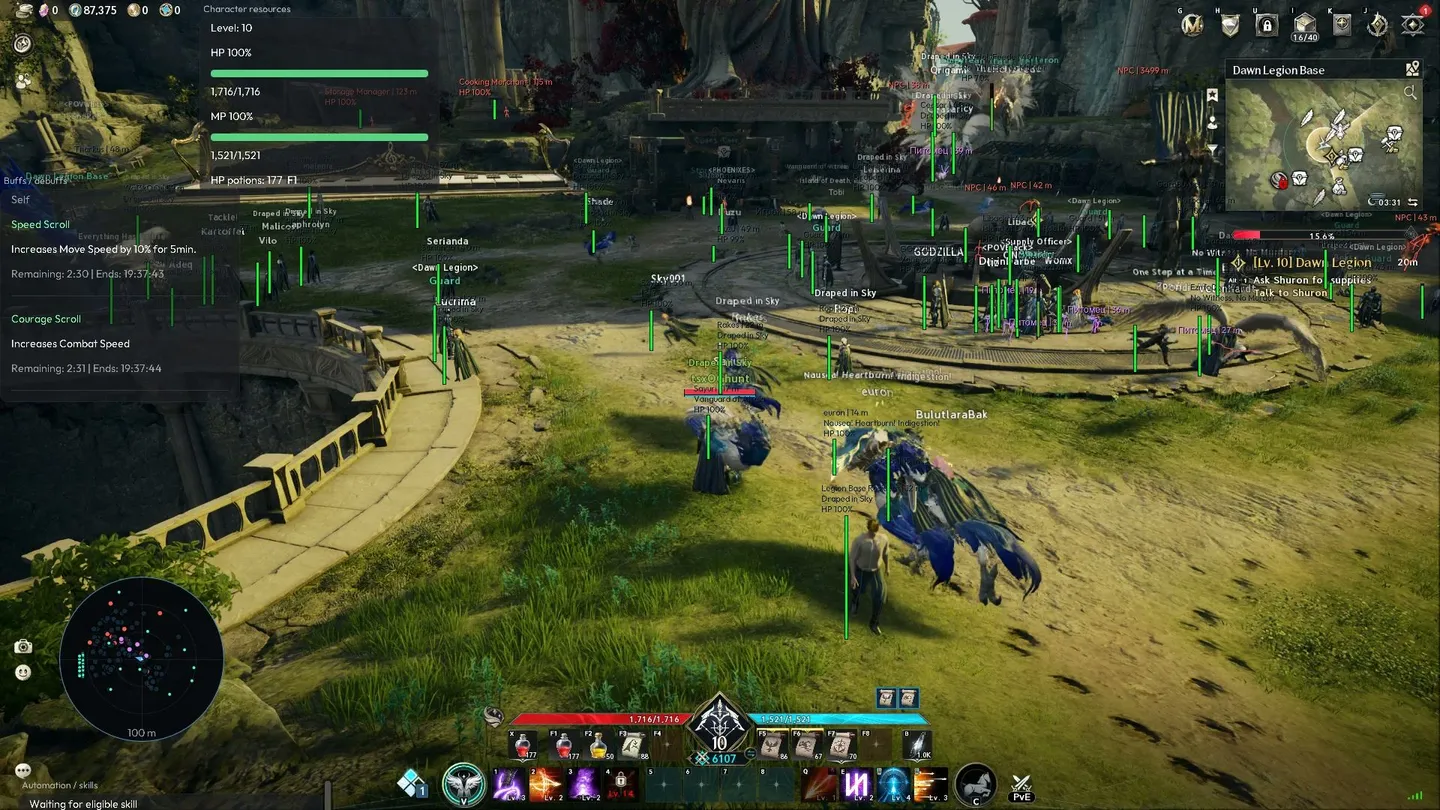
Xernel for Aion 2 is ESP and a bot in one: it runs your skill rotation, heals, dodges and picks up loot, and you decide where to go. The rotation works on the target you selected in the game, with a set interval between actions, and the cheat reads your skill keys from the game interface on its own. Below the HP percentage you set, healing starts, yourself first if you want, and potions are used with an eye on stock and cooldown. A boss AoE or a target cast is seen in advance: the cheat dodges before the hit and steps out of the zone. Loot pickup, resource gathering and world interactions go through the same action button a player uses. Across up to sixteen pinned points the cheat builds a route, and quest navigation takes you to the objective on one key. ESP highlights players, monsters, pets, projectiles and resources, next to a radar with adjustable range and panels for party, buffs and debuffs. The End key stops all automation at once.
- Windows
- 10(all)/11(all)
- Processor
- All
- Graphics card
- All
- Launchers
- All
- Spoofer
- No built-in/Choose spoofer
List of Hack Features
Rotation & auto battle
- Auto rotation — casts your skills in order
- Auto battle — fights the target selected in the game, taking distance, MP cost, cooldowns and combo follow-ups into account
- Combat toggle key — on a key such as CapsLock
- Rotation order — round robin and other orders
- Action interval and skill retry delay
- Keybinds are detected from the game HUD
- Pause rotation on low MP — with its own MP threshold
Healing
- Auto heal — yourself and your target
- Self healing first
- Heal below HP — a separate threshold
- Auto HP potion — checks stock and cooldown, with its own HP threshold
- Auto healing and cleansing potions — used from the quick bar
Approach & dodge
- Auto approach selected target — with a max approach distance
- Fallback skill range
- Auto dodge attack warnings — boss AoE and target casts
- Dodge selected-target casts
- In-game dodge key and dodge direction
- Dodge before impact and dodge minimum interval
- Extra movement on area warnings — steps out of the zone
- Adaptive escape direction, max escape movement and escape duration
ESP
- Players
- NPCs and monsters
- Other characters
- Pets and mounts
- Gathering and resources
- Loot and chests
- Environment and interactables
- Projectiles
- World markers
- World geometry
- Other actors
- A colour of its own for every category
- Show own character
- Max distance and name search
- Extended load range — experimental, up to 250 m with fast range ramp-up
Labels & markers
- Names, distance and HP
- Level, guild and title
- Avoid overlapping labels
- Text size and label limit
- Character boxes
- Skeleton
- Object markers — boxes from the real mesh bounds
- Snaplines
- Crosshair
Radar
- Radar — with range and size
- Rotate with camera
- Highlight selected target
- Highlight party members
- Drag the radar while the menu is open
Loot & interaction
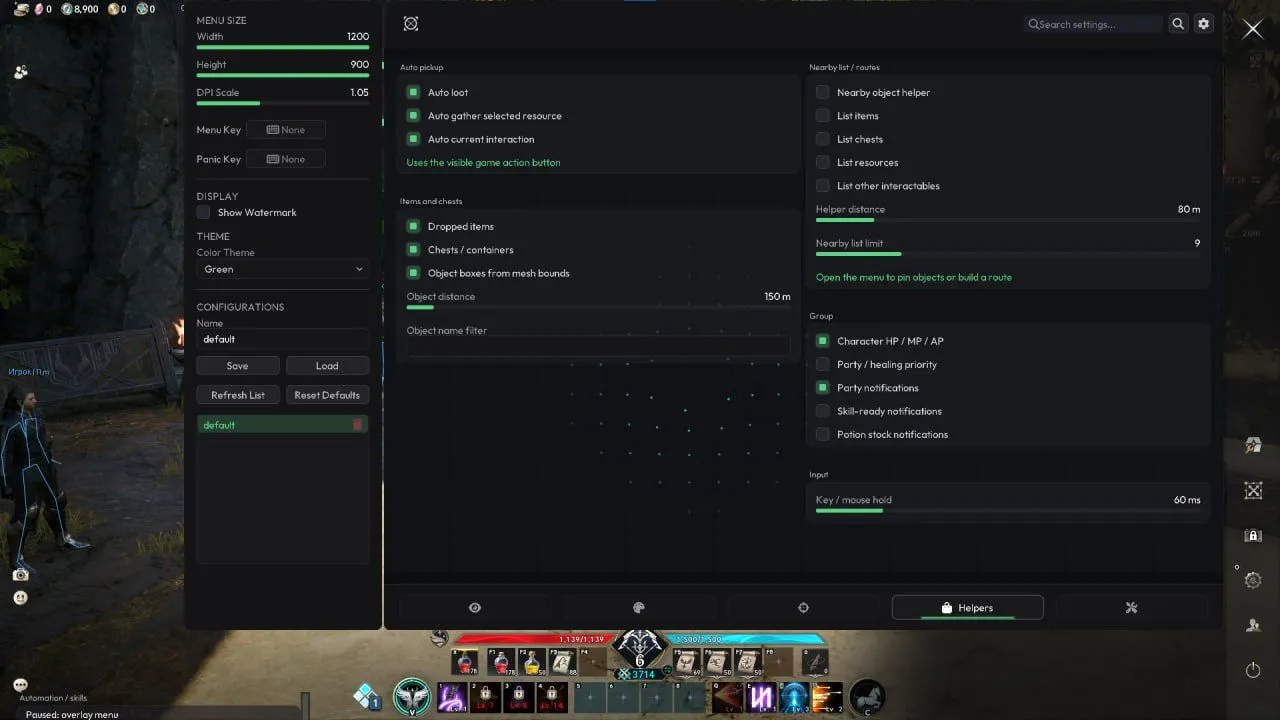
- Auto loot
- Auto gather selected resource
- Auto current interaction — uses the visible game action button
- Dropped item pickup within range
- Chests and containers
Objects & routes
- Nearby items, chests, resources and other interactables in a list
- Helper distance and list limit
- Pin up to 16 waypoints — with a nearest-neighbor route
- Direction arrow with distance and elevation
- Object name filter — with Cyrillic support
Quests
- Active quest list with objectives
- World markers for quest destinations
- One-key native quest navigation
- Progress and completion notifications
Party & group
- Party and raid HP, MP and AP
- Member status — offline, dead or out of range
- Members' buffs and debuffs
- Party healing priority — lowest-HP heal recommendation
- Party, skill-ready and potion stock notifications
Buffs & target info
- Self, target and party effect panels
- Real effect names from the game's own localization
- Live timers, local end time and urgency sort
- Stack counts and permanent markers
- Scroll descriptions from in-game tooltips
- Current target card — name, HP, level, guild, title and distance
- Attack warnings for boss AoE and target casts
- Timer interpolation between HUD updates
Safety & settings
- One-key combat toggle
- Auto pause on menu, dialogs and chat
- Auto pause on focus loss, death and your own cast
- Scheduled release of held keys — key and mouse hold time
- End key stops all automation
- Draggable panels with saved positions
- Custom HP, MP, AP and cast meters
- Cyrillic, Korean and Chinese fonts
- Menu size, DPI scale, menu key and panic key
- Colour theme and watermark
- Configs — save, load, refresh, reset defaults
The developer may change the program's functionality at any time, but we always do our best to keep this information up to date