

Ghost Cheat for ARC Raiders
How to install and launch
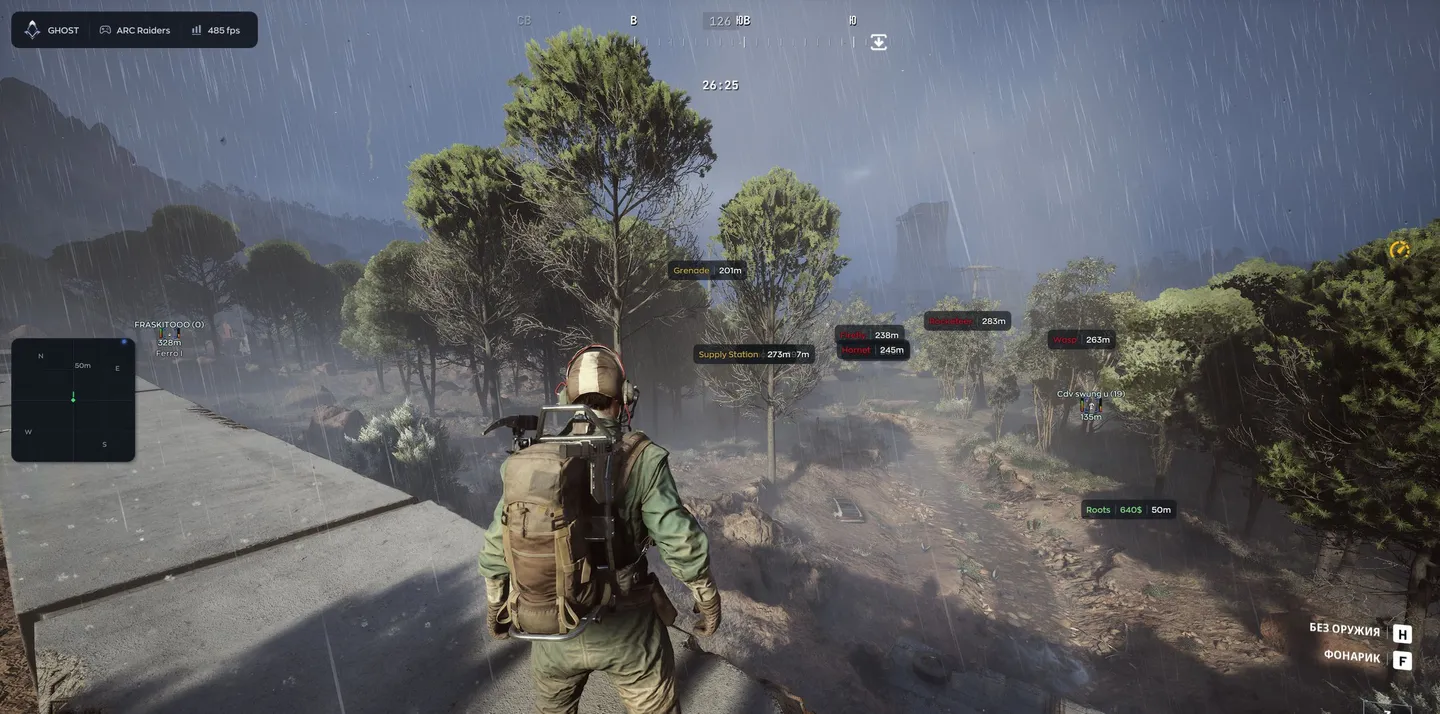
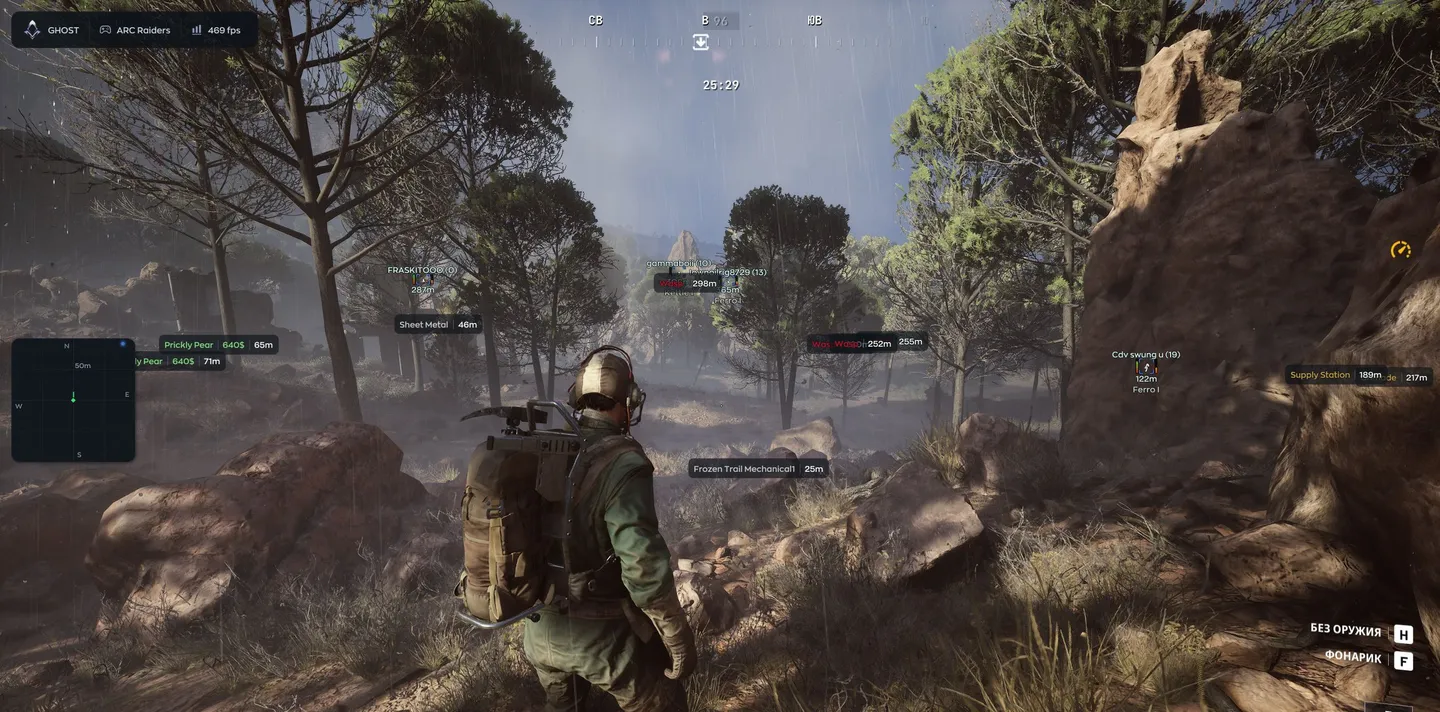
Ghost is a wallhack-first ARC Raiders cheat for players who want to see raiders, ARC drones and loot through walls before committing to a fight. For visibility, the player ESP offers two methods. Render Time is the old one, while Raycast tests line of sight against world geometry collision and is much more accurate, with a separate range for how far geometry is gathered. Per-bone Visibility paints the skeleton bone by bone, so a raider half behind a rock shows exactly which limbs are exposed. Beyond players, the object layer covers 21 ARC drone types, small and medium ARC husks, the cargo ship, raider caches and corpses, and the loot filter colors items by rarity and lists named ones with their value. The aimbot aims through memory or the mouse, and a humanize block adds jitter, a deadzone and a reaction delay set in milliseconds. Spread control is gone. The developer removed No Spread in this update, and both the aimbot Enable switch and No Recoil carry the developer's risky mark.
- Windows
- 101903+/11(all)
- Processor
- All
- Graphics card
- Nvidia/AMD
- Launchers
- Steam
- Streamproof
- no
- Spoofer
- No built-in/Choose spoofer
List of Hack Features
Aimbot
- Enable — turns the aimbot on; the developer marks it as risky
- Field of View — the angle inside which the aimbot reacts
- Smooth — how smoothly the aim travels; the higher, the less noticeable
- Visible Check — aims only at targets that are in sight
- Target Lock — stays on one target until it goes down
- Aim Method — Memory or Mouse
- Hitbox — the body part to aim at, head or chest for example
- Target Priority — how the next target is picked, closest to the crosshair for example
- Recoil Control — recoil compensation, set in percent
- Max Distance — how far the aimbot reaches
Humanize
- Enable — turns humanized aim movement on
- Jitter — small shakes that imitate a hand on the mouse
- Deadzone — a zone where the aimbot leaves the crosshair alone
- Reaction Min and Max — the range of delay before the aim starts moving, in milliseconds
- Max Speed — the ceiling on how fast the aim travels
Player ESP
- Enable — turns the player ESP on
- Visible Check — shows only the players you can actually see
- Raycast Range — how far world geometry is gathered for the raycast check
- Visibility Method — Render Time or Raycast; Raycast checks line of sight against world geometry collision and is much more accurate
- Box — a frame around the model
- Skeleton — the bones of the player model
- Per-bone Visibility — the skeleton is colored bone by bone: visible bones in one color, bones hidden behind walls or rocks in another
- Name — the nickname above the player
- Distance — how many meters away the player is
- Snapline — a line drawn to the player
- Offscreen Arrows — point toward enemies outside the frame
- Health — the health bar
- Player Status — whether the player is alive, wounded and so on
- Weapon — what the target is holding
- Team ID — which team the player belongs to
- Armor Bar — how much armor is left
Radar and compass
- Enable — turns the radar on
- Draw Outline and Draw Background — the radar border and backdrop
- Point Style — circle, square or triangle dots
- Size — how big the radar is on screen
- Max Distance — how far the radar reaches
- Point Size — the size of the dots
- Zoom — the radar scale
- Compass Bar — a compass strip across the top of the screen, on its own switch
Loot ESP
- Enable — turns the loot ESP on
- Rarity filters — Common, Uncommon, Rare, Epic and Legendary, each with its own color
- Filter — a list of named items such as Equalizer, Dolabra and Aphelion Rifle with their value, plus a search by name
Objects: drones, containers, world
- Drones — 21 ARC types: Wasp, Hornet, Rocketeer, Pop, Fireball, Tick, Turret, Sentinel, Snitch, Bastion, Spotter, Leaper, Surveyor, Queen, Bombardier, Shredder, Matriarch, Firefly, Comet, Vaporizer and Turbine
- ARC Husk — small and medium ARC husks
- Cargo Ship — the ARC cargo ship
- Containers — lockers, crates, furniture, dumpsters, plants, vehicles, weapon cases, shelves, cabinets, electronics, servers, wall panels, bags, raider caches, special and other
- World — mines, hatches, supply, fuel cells, puzzles, field crates, barricades and grenades
- Corpse — bodies of killed enemies
Misc
- No Recoil — removes weapon recoil; the developer marks it as risky
- Rapid Fire — makes the weapon fire faster
- Flashlight Color — changes the color of the flashlight
Settings and AI chat
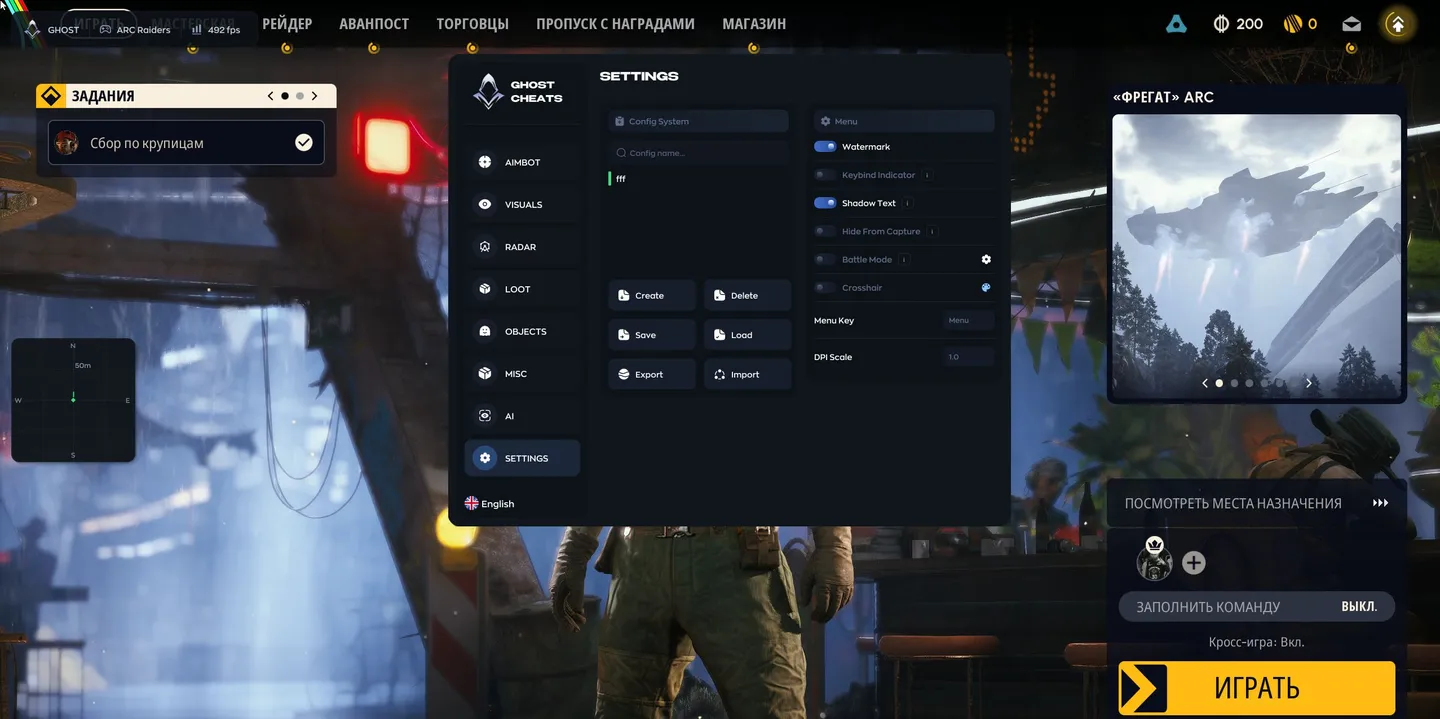
- Config System — create, delete, save and load configs, with a search by name
- Export and Import — move configs out of the cheat and back in
- Watermark — the cheat's watermark on screen
- Keybind Indicator — a panel with the assigned hotkeys
- Shadow Text — a shadow under menu and ESP text for readability
- Hide From Capture — hides the menu from screen capture
- Battle Mode — quickly drops extra interface for a clean picture
- Crosshair — a custom crosshair over the game
- Menu Key — the key that opens the menu
- DPI Scale — the interface scale
- VSync — vertical sync for the overlay, on its own switch
- High Performance — a high performance mode for more frames
- AI Assistant — a chat on the AI tab with a built-in AI that answers questions about the cheat's settings
The developer may change the program's functionality at any time, but we always do our best to keep this information up to date


