


Vengeance Cheat for ARC Raiders
How to install and launch
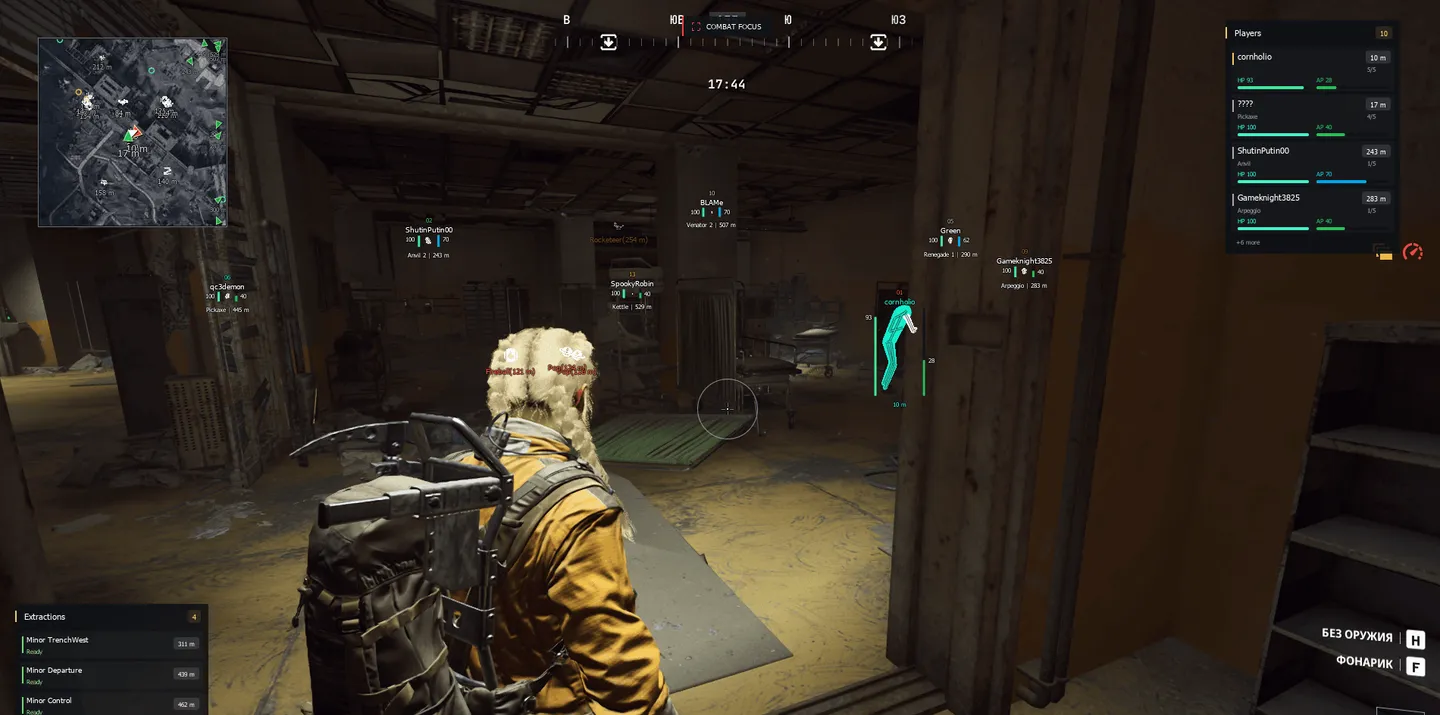
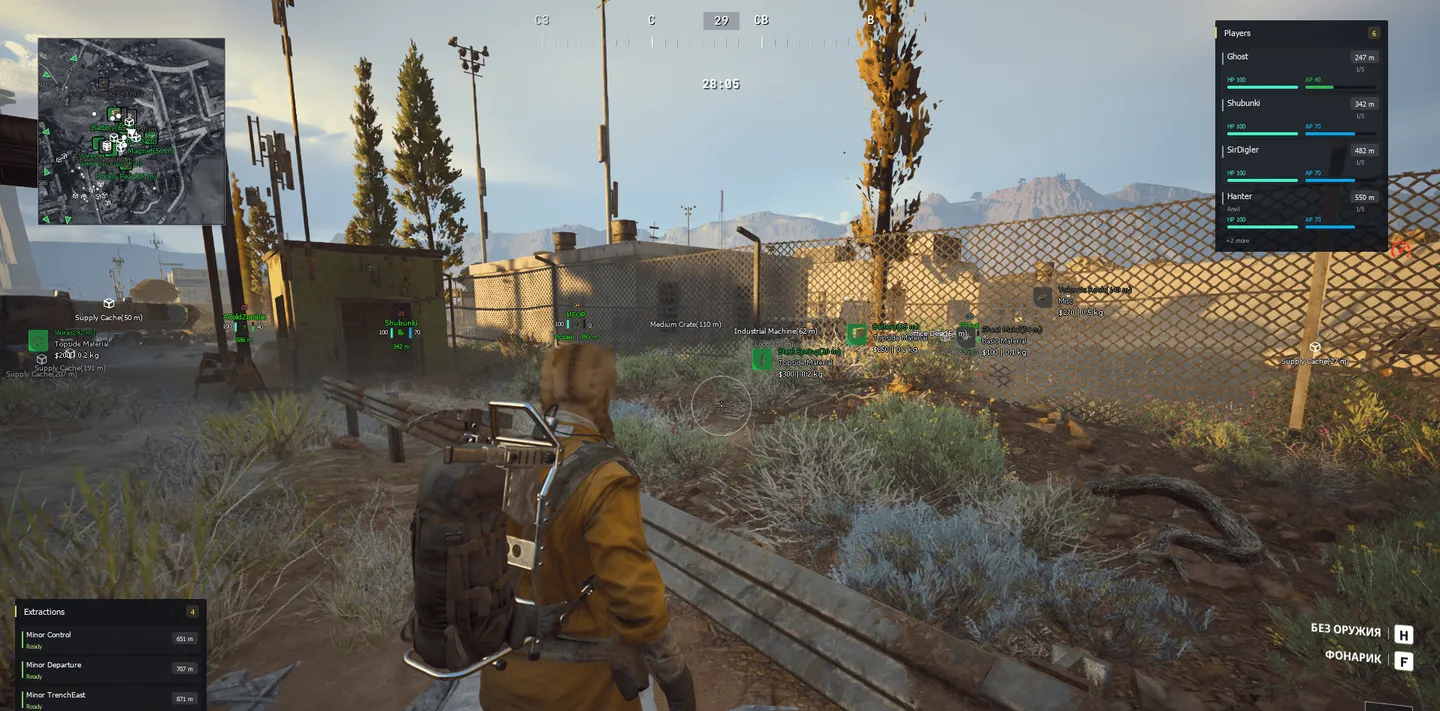
Vengeance for ARC Raiders is a wall hack that puts the whole raid on a map. Its radar draws the real map of the raid under the markers, switches floors on multi-level maps and adds layers with extractions, hatches, locked doors and quests. Three HUD panels keep what matters in a fight on screen: the four nearest raiders with weapon, health, armor and a 0–5 threat score, up to six extractions with their state, and up to five items with their value. Above each nickname the ESP prints a squad code from 01 to 25, which makes it easy to tell who plays together, and floating damage numbers add a series of hits into one figure. For loot there is a whitelist where you tick specific items, set a price range from $0 to $30000 and find them by original or translated name. The aimbot is the plain part, with memory aim on a held key, smoothing from 1 to 15, prediction and a head, neck, chest or nearest-bone target. There is a Stream Proof switch in the menu, but in this build it does not hide the overlay from OBS or Discord capture.
- Windows
- 10(all)/11(all)
- Processor
- All
- Graphics card
- Nvidia/AMD
- Launchers
- Steam, Xbox
- Streamproof
- no
- HWID Spoofer
- No built-in/Choose spoofer
List of Hack Features
99 features in 12 groupsAimbot
- Memory Aimbot - Aims at a target inside the FOV while the aim key is held.
- Visible Check - Skips targets that are not visible when choosing who to aim at; works separately from the ESP visibility setting.
- Aim Key / Aim Key 2 - Two separate keys can trigger the aimbot.
- Smooth - Aim smoothing from 1 to 15.
- Prediction - Leads moving targets based on projectile speed.
- Head Lock / Neck Lock / Chest Lock - Fixes the aim point on the head, neck or chest.
- Nearest Bone - Aims at the body point closest to the crosshair.
- Draw FOV - Draws the FOV circle in a color of your choice.
- Radius - FOV radius from 1 to 120.
- Crosshair - Static crosshair in the center of the screen, color adjustable.
Battle Mode
- Battle Mode Key - One key switches the combat mode: item, container and extraction labels disappear from the screen and from the radar, and a COMBAT FOCUS tag appears at the top.
- Hide World Drones - In Battle Mode, also hides ARC drones in the world.
- Hide Radar Drones - In Battle Mode, also removes drones from the radar.
Player ESP
- Enable Box - Box around every player.
- Box Style - 2D Bounding, 2D Corner, 3D Corner or None.
- Box Fill - Semi-transparent fill for the 2D box styles.
- Visibility - Checks which body parts are visible against the level geometry and colors the ESP by the result; players behind walls are still drawn.
- Body Mesh - Fills the player silhouette, built from the pose, with no grid or scan lines; with Visibility on it takes the visible or hidden color, an unknown result gets a neutral one.
- Visible Body / Hidden Body - Body fill colors for visible and hidden players.
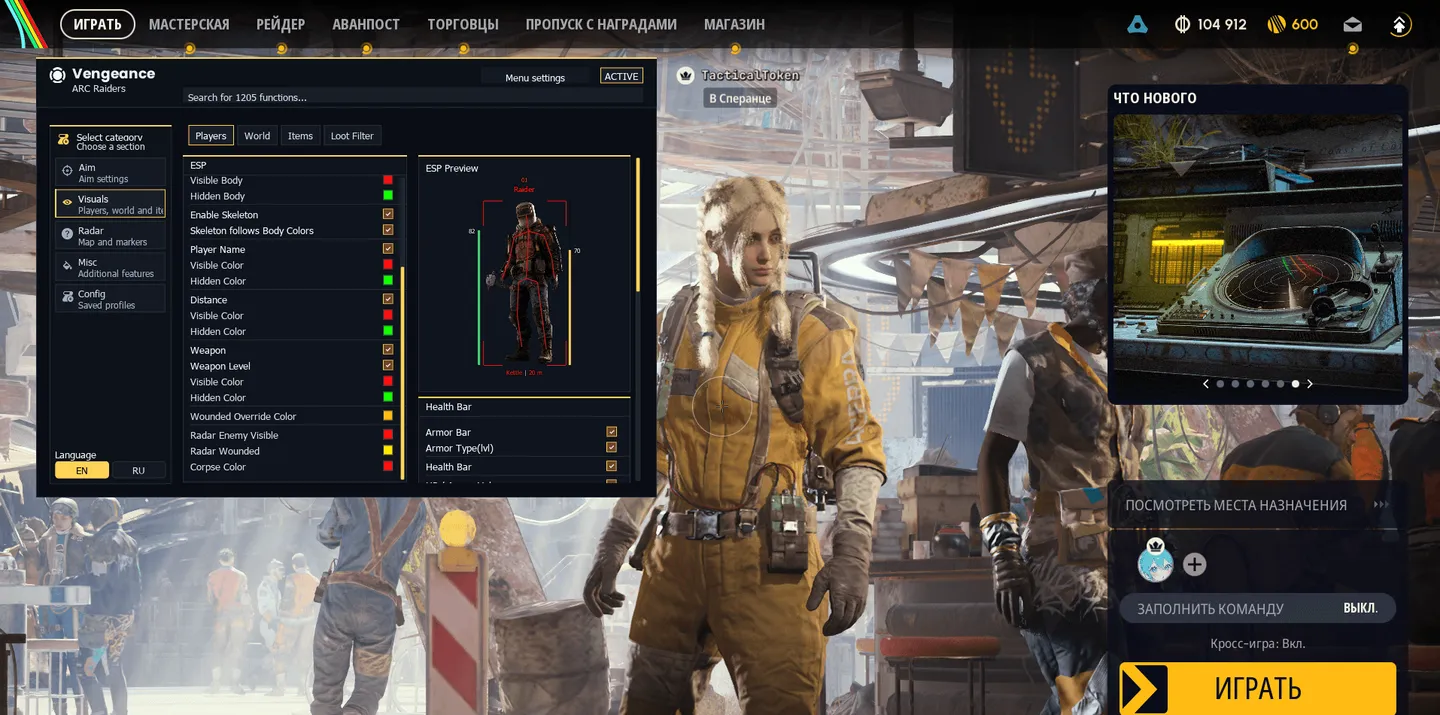
- Enable Skeleton - Player skeleton.
- Skeleton follows Body Colors - The skeleton takes the body colors; turn it off to set separate visible and hidden skeleton colors.
- Player Name - Nickname, with separate colors for visible and hidden players.
- Distance - Distance in meters, with visible and hidden colors.
- Weapon / Weapon Level - Name of the weapon in hand and its level when the game provides it.
- Health Bar / Armor Bar - Thin health bar to the left of the player and armor bar to the right.
- Armor Type(lvl) - Colors the armor bar by armor type and level.
- HP / Armor Values - Numbers next to the health and armor bars.
- Damage Numbers - Floating damage from health and shield loss; a series of hits adds up into one number.
- TeamId - Squad code from 01 to 25 above the nickname: one squad shares a code and color, your own squad is marked ALLY, an unknown one --.
- Wounded Override Color - Separate color for wounded and downed players.
- Players Distance - Player ESP range up to 1000 m; 0 removes the limit.
- Corpses / Corpses Distance - Player corpses and remains, with their own color and range up to 1000 m.
- ESP Preview - A model in the menu shows the box, skeleton, name, squad, weapon, distance and bars as you set them.
HUD panels
- Player HotBar - Panel with the four nearest players: name, distance, weapon, health and armor, plus a count of everyone in range.
- Threat Score - A 0–5 threat rating in Player HotBar from distance, visibility and health; it is the cheat's own estimate, not a rank from the game.
- Extraction HUD - Up to six extractions with name, state and distance, plus a timer when the game has one.
- Loot HUD - Up to five items with name, distance, value and rarity color; follows the item filters and needs Enable Items.
- Sort by distance - Sorts Loot HUD by distance instead of by value, highest first.
- Panel position - HotBar, Extraction and Loot HUD each have their own X / Y and reset button, and with the menu open you can drag them by mouse.
ARC drone ESP
- Enable Drones - ESP for ARC drones and machines.
- ARC types - All 20, each with its own switch, color and range: Bombardier, Hornet, Rocketeer, Fireball, Pop, Surveyor, Wasp, Tick, Turret, Bastion, Leaper, Spotter, Snitch, Shredder, The Queen, Sentinel, Turbine, Matriarch, Skulker and Bully.
- Global Max Distance / Per-type Max Distance - A shared range and a range per type, up to 1000 m.
- Show Drone Icons - Small icon of the ARC type, proportions kept.
- Show Distance Text - Distance next to the name, as in Name(38 m).
Container and extraction ESP
- Enable Containers - Containers and other supported world objects, such as Medium Crate, Industrial Machine or Office Desk.
- Container types - Each with its own switch, color and range: Supply Cache with a cargo-box icon, ARC Wreck with its own icon, Weapon Case, Ammo Box, Medical Bag, Backpack, Grenades, crashed and intact Probe, Raider Container, Cart Crate, Security Camera and Quest Container.
- Global Max Distance / Per-type Max Distance - A shared range and a range per container type, up to 1000 m.
- Show Distance Text - Distance next to the container name.
- Enable Extractions / Extraction Distance - Extraction points in the world, with their own color and range up to 1000 m.
Loot ESP
- Enable Items - ESP for items lying in the world.
- Max Distance - Item ESP range up to 1000 m.
- Minimum Value - Hides items cheaper than the set value, from $0 to $30000.
- Items: Rarity - Common, Uncommon, Rare, Epic and Legendary switch on separately; item names take the rarity color: grey, green, blue, purple and gold.
- Items: Type / Materials - Basic Material, Refined Material, Topside Material and Recyclable.
- Items: Type / Equipment - Quick Use, Shield, Augment, Modification and Blueprint.
- Items: Type / Weapons - Hand Cannon, Battle Rifle, Assault Rifle, Sniper Rifle, SMG, Shotgun, Pistol, LMG and Special Weapon.
- Items: Type / Other - Ammunition, Key, Trinket, Nature and Misc.
- Show Icons - Item icon on a background in its rarity color.
- Show Type - Item category from the game catalog.
- Show Value / Show Weight - Value and weight; with both on they share one compact line like $12500 | 1.5 kg.
- Show Distance - Distance next to the item name.
- Item Text - Fixed sharp 12px font with an outline.
Loot Filter
- Enable Loot Filter - Replaces the standard Minimum Value, Rarity and Type filters with a list of specific items inside a price range.
- Search items... - Searches by original and translated names; the search only narrows the list in the menu, the ticked items form the ESP whitelist.
- Min Value / Max Value - Price range from $0 to $30000; Max Value 0 means no upper limit.
- Item Checkboxes - Ticked items inside the range are the only ones shown; with nothing ticked, every item in the range counts.
- Select All / Clear All - Ticks or clears every item left in the list after search and price filtering.
- Items List - Catalog with icons, rarity, prices and a counter of ticked items, sorted from the cheapest.
Radar and map
- Enable Radar - Radar with player markers, an arrow for you and a thin frame.
- Map on radar - Map of the raid under the markers; the current map is detected automatically once you enter a raid.
- Map opacity - Map background opacity from 0.1 to 1.0.
- Floor - On multi-level maps: Automatic, Upper / surface or Lower / underground.
- Map Layers - Extractions and hatches, locked doors, quests and event locations, depending on the map; these are reference pins, not a sign that the event is live in your raid.
- Waypoints / Clear waypoint - With the menu open, Ctrl + click on the radar sets a waypoint; Clear waypoint removes it.
- Radar Zoom - From 0.1 to 8.0.
- Radar X / Radar Y / Radar Size - Position and size from 100 to 600 px; with the menu open the radar can be dragged.
- Radar Players - Direction arrows and distance for players, your squad in its own color.
- Draw Items / Item Radar Dist - Items on the radar with their own range up to 1000 m, filtered by the active loot filters; icons and name/distance labels switch separately, names in rarity colors.
- Draw Corpses / Corpses Radar Dist - Corpses and remains on the radar, range up to 1000 m.
- Draw Drones / Drone Radar Dist - ARC drones with icons and an optional short distance label, without names, range up to 1000 m; all 20 types have their own switches and ranges, independent of the world ESP.
- Draw Containers / Cont. Radar Dist - Containers with a shared range up to 1000 m; 13 types switch and range separately: ARC Wreck, Weapon Case, Ammo Box, Medical Bag, Backpack, Grenades, Supply Cache, crashed and intact Probe, Raider Container, Cart Crate, Security Camera and Quest Container.
- Draw Extractions / Extraction Radar Dist - Extractions on the radar with their own range up to 1000 m.
Colors
- Visible Color / Hidden Color - Separate colors for visible and hidden players: boxes, skeletons, names, weapons and distance.
- Wounded / Corpse / Radar Colours - Colors for wounded players, corpses and visible enemies on the radar.
- Drone / Container Colours - Own color for every ARC and container type.
- FOV / Crosshair / Extractions - Separate colors for the FOV circle, the crosshair and extractions.
Misc
- Increased Brightness / Brightness - Brightens the scene through exposure, strength from 0.00 to 1.00.
- Flashlight Override - Overrides the flashlight: Flashlight Brightness from 100 to 500000 and Flashlight Color.
- Auto Fire / Auto Fire Key - Clicks the left mouse button repeatedly while the key is held; this is repeated fire, it does not look for a target under the crosshair.
- Function Markers - Brightness, flashlight and auto fire carry red markers in the menu.
Configs and menu
- Config Name - Name of the profile to create or overwrite.
- Configuration List - Saved profiles; picking one copies its name into Config Name.
- Save - Writes the settings to a named JSON file: a new name creates a profile, an existing one is overwritten.
- Load - Applies the selected profile.
- Refresh - Rereads the list of config files.
- Delete - Deletes the selected config file.
- Autosave - Saves changes to the default profile on its own; named profiles are managed separately.
- Language - Menu in English or Russian.
- Search - Search field across all menu functions.


