


UDP Cheat for Apex Legends
How to install and launch
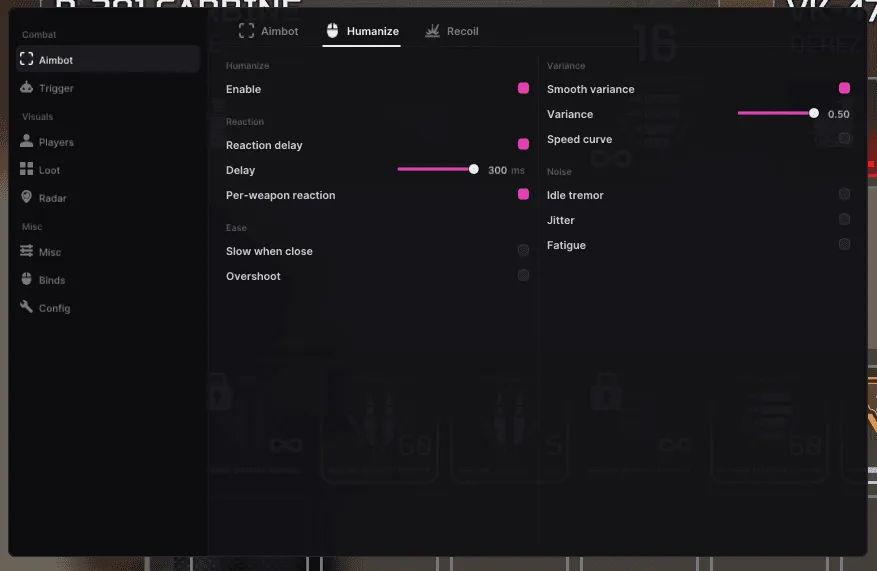
UDP for Apex Legends automates the whole round, not only the shot. SmartLoot picks items up by itself, and with conditions attached: an ammo filter by caliber, an attachment gate that takes only what fits the guns already in your hands, a separate cap on cells, batteries, syringes and med kits. Under Movement sit super glide, tap strafe, bunny hop, wall jump and the grapple, while Auto Ping marks enemies at a set distance and Auto Reload refills between fights. The aim itself hides behind a Humanize tab of its own: nine parameters that work on how the assist looks rather than where it lands — overshoot with a chance and a magnitude, idle tremor, jitter below one pixel, fatigue drift that builds up over a session. Silent aim is here too. The developer left it on the Kraber and nowhere else.
- Windows
- 10(all)/11(all)
- Processor
- All
- Graphics card
- Nvidia/AMD
- Launchers
- All
- HWID Spoofer
- No built-in/Choose spoofer
Buy access
Instant delivery
List of Hack Features
103 features in 15 groupsAimbot
- Aim on/off - Main aimbot switch.
- Aim Key 1 / Aim Key 2 - Two separate hold keys for the assist.
- Smooth (main) - How gradually the crosshair travels to the target.
- FOV - Radius of the zone in which a target gets picked up.
- Max Distance - Range beyond which the aimbot stays off.
- Deadzone - Zone around the crosshair where the aim does not engage.
- Kill Delay - Pause after a kill before the next target is taken.
- Visible Only - Works only on targets in line of sight.
- Ignore Knocked - Skips downed enemies.
- Bone Switch - Switching between bones on the model.
- Hitbox priorities - Head, body, left hand, right hand and legs, each with its own priority.
- Per-Weapon Smooth - Separate smoothing for SMG, AR, LMG, sniper, marksman, shotgun and pistol.
- ADS FOV Scale - Scales the FOV when aiming down sights.
- Proximity FOV - Widens the FOV at close range.
- Prediction Movement - Lead for the target's movement.
- Prediction Bullet Drop - Compensation for bullet drop.
- Input Mode - Aim is fed through memory or through the mouse.
RCS
- On/off - Master switch for recoil control.
- Pitch Coefficient - How much vertical recoil is compensated.
- Yaw Coefficient - How much horizontal recoil is compensated.
Humanize
- Master on/off - Turns the whole humanization layer on.
- Reaction Delay (+ React ms) - Pause before the aim starts, set in milliseconds.
- Weapon-Specific Reaction - Its own reaction time per weapon class.
- Smooth Variance - Spread of the smoothing value instead of a fixed one.
- Curve Variance - Spread of the path the crosshair takes to the target.
- Close-Range Slow-Down - Slows the aim down at short distance.
- Overshoot (chance + magnitude) - How often the aim goes past the target and by how much.
- Idle Tremor - Micro-shake of the crosshair while idle.
- Fatigue Drift (onset + magnitude) - Drift that builds up over a session, with its own onset.
- Sub-pixel Jitter - Jitter smaller than one pixel.
PSilent (Silent Aim)
- On/off - Silent aim, Kraber only.
- Hold ms - Window in milliseconds during which it works.
- Max Degrees - Ceiling on how far the shot may be turned.
TriggerBot
- On/off - Fires as soon as a target is under the crosshair.
- Key - Hold key for the triggerbot.
- Delay - Pause before the shot.
- FOV - Zone in which the shot triggers.
- Per-weapon-group Exclude - Weapon classes the triggerbot skips.
- Hitbox Priorities - Which body parts trigger the shot.
Player ESP
- Box (Outline / Filled / Corners) - Three box styles around the player.
- Fill Alpha - Opacity of the filled box.
- Corner Factor - How much of the corner box is drawn.
- Visible Color / Occluded Color - Separate colours for targets in sight and behind cover.
- Health Bar - Position of the bar and gradient or solid fill.
- Shield Bar - The same for shields.
- Name - Nickname above the target.
- Distance - Range to the target.
- Team indicator - Marks squad membership.
- Weapon - The weapon in the enemy's hands.
- Knocked icon (skull) - Skull over downed players.
- Skeleton - Model skeleton.
- Team Color Mode - Off, name, skeleton, name and skeleton, or all at once.
- Off-Screen Indicator - Arrows to enemies outside the screen.
- Gadget ESP - Draws legend gadgets placed on the map.
- Gadget Range - Distance in metres beyond which gadgets stop showing.
- Gadget HP Bar - Health bar on the gadget itself.
- Gadget Distance - Range to the gadget.
- Max Distance - Range beyond which the ESP stops drawing.
- Team Check - Skips your own squad.
- Mixtape Mode - A separate mode for Mixtape playlists.
Radar
- On/off - Turns the radar on.
- Size - Overall size of the radar.
- Range - Range the radar covers.
- Position (draggable) - The radar is dragged anywhere on the screen.
- Opacity - Transparency of the radar.
- Corner Factor - Shape of the radar corners.
- Spectated counter badge - Badge with the number of spectators.
Loot ESP
- Category Filters - Weapons, ammo, healing, armor, backpacks, scopes, attachments, grenades and utility, each toggled separately.
- Per-category color - Its own colour for every category.
- Per-category max distance - Its own range for every category.
- Names - Item names.
- Distance - Range to the item.
- Rarity Style (Off / Dot / BG-Stripe) - How rarity is marked.
- Bundle Mode (radius + distance thresholds) - Groups nearby items by radius and distance.
- Bundle grouping of identical items - Identical items collapse into one line, Light Ammo x7 for instance.
SmartLoot
- Master on/off - Turns automatic pickup on.
- Auto Heals - Picks healing items up.
- Auto Ammo - Picks ammunition up.
- Auto Armor - Picks armor up.
- Backpack Gate - Condition on backpack capacity.
- Armor Gate - Condition on the armor already worn.
- Ammo Caliber Filter - Only the calibers your weapons use.
- Attachment Compatibility Gate - Only attachments that fit the guns in hand.
- Heals Count Gate - A separate cap per type: cell, battery, syringe, med kit.
Movement
- Super Glide - Automates the super glide.
- Bunny Hop - Automatic bunny hopping.
- Tap Strafe - Automates the tap strafe.
- Auto Grapple - Automates the grapple.
- Wall Jump - Automates the wall jump.
Assist
- Auto Ping (distance + cooldown) - Pings enemies on its own, with a range and a cooldown.
- Auto Reload (cooldown) - Reloads on its own, with a cooldown.
Spectator
- On/off - Warns that someone is spectating you.
- Notify bar - A line with the count and the names of the spectators.
- Radar chip - The same warning on the radar.
BattleMode
- On/off - Master switch for the mode.
- Hold Key - Key that keeps the mode on while held.
- Toggle Key - Key that switches it on and off.
- Per-weapon-group Exclude - Weapon classes the mode skips.
FOV Circles
- Draw FOV Circle - Draws the aimbot zone on the screen.
- Proximity FOV expansion - Shows how the zone widens at close range.
Settings
- Overlay FPS cap - Overlay frame limit from 60 to 240.
- Server Configs - Save, load and delete configs on the server.
- Team Check / Mixtape toggles - Global switches for the squad check and Mixtape.


