


Ancient Radar — Delta Force radar (Hawk Ops)
How to install and launch
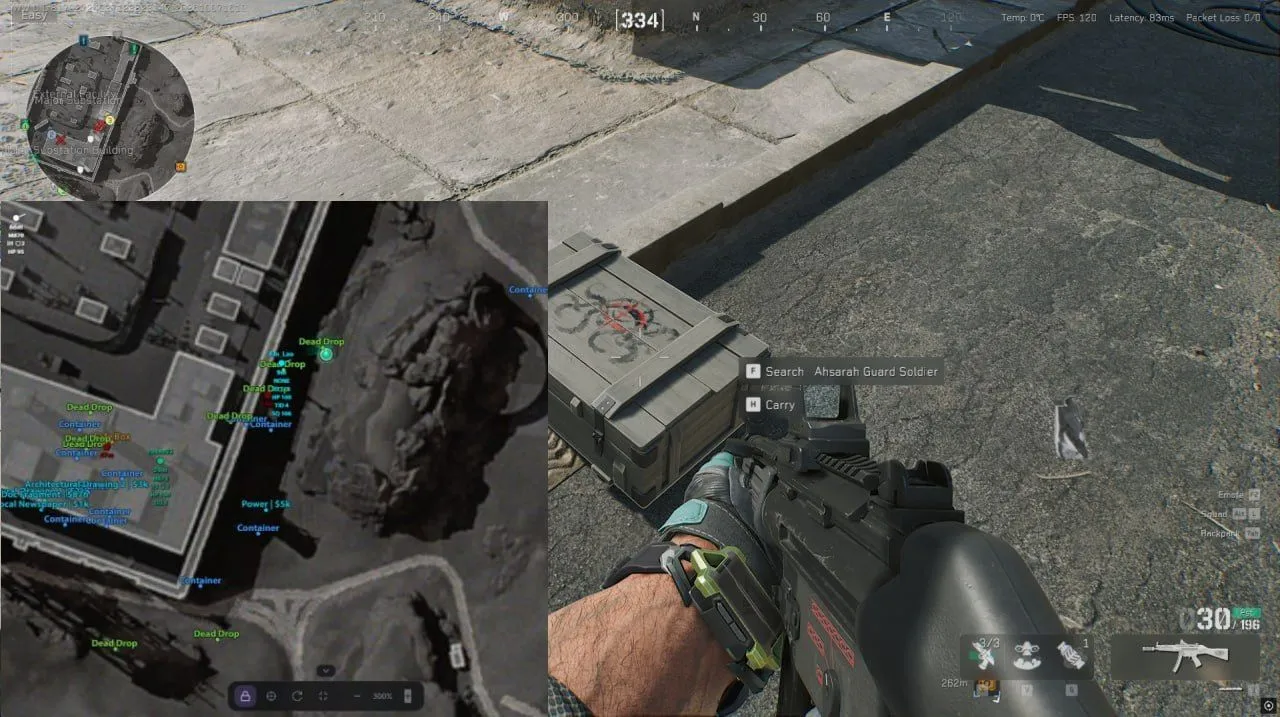
Ancient Radar puts a Delta Force match onto a map in your browser, and on Operations maps it watches the loot as closely as the players. Next to each enemy you see the nickname, the gun in hand with current and max ammo, health, helmet and armor level, kills, and team and squad ID. A small marker tells you whether the target is a floor above or below you. Bots and bosses get markers too. Keycards, Mandel Bricks, safes and computers the radar keeps in categories of their own, each with its own distance, color and text size, while rarity from 1 to 6 and a minimum price are filtered separately for items and for containers. Since the radar is a web page, it opens on a phone as well, and the same link can be handed to your squad. Loot only shows on Operations maps, so in Warfare you are left with players and AI.
- Windows
- 10(all)/11(all)
- Processor
- All
- Graphics card
- All
- Launchers
- Official launcher, Steam, Garena, WeGame, Epic Games
- Spoofer
- No built-in/Choose spoofer
List of Hack Features
60 features in 7 groupsPlayers
- Enemies and teammates in real time
- Different markers for alive, knocked and dead players
- Nickname
- Weapon in hand
- Ammo: current and maximum
- Health, including health while knocked
- Helmet and body armor level
- Kill count
- Team ID and squad ID
- Distance to each target
- Facing direction
- Marker for a target on the floor above or below you
- Own color for targets in line of sight
- Enemies from the same team share a color automatically
- Correct position while a player is in a vehicle
AI and bosses
- Regular AI enemies
- Bosses
- Knocked and dead AI
- Weapon the AI is holding
Loot
- Shown on Operations maps only
- Categories: Weapons, Attachments, Ammo, Resources, Consumables, Keycards, Mandelbrick, Backpacks, Helmets, Body armor, Chests, Dead bodies, Computers, Containers, Safes
- Unknown items as a category of their own, for diagnostics
- Every category turns on and off separately
- Container type on the label: Dead Drop, Box, Container
- Item names
- Value of an item or a container
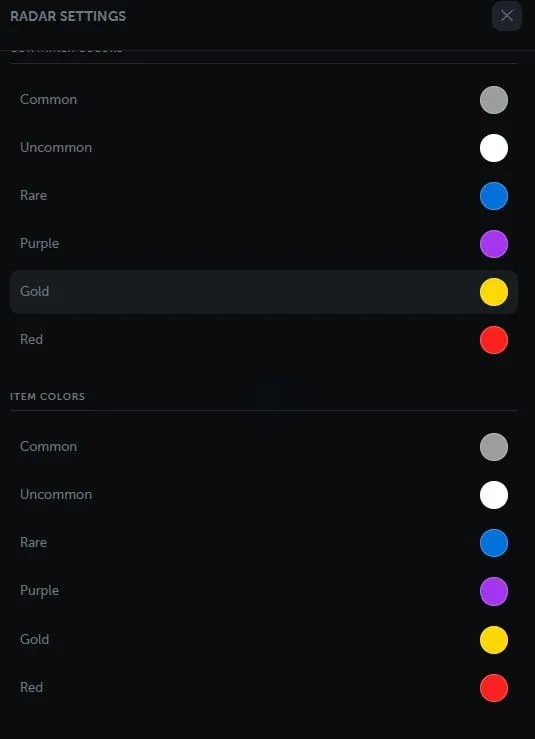
- Rarity filter from 1 to 6: Common, Uncommon, Rare, Purple, Gold, Red
- Minimum price filter
- Global max distance (0 means unlimited)
- Distance limit, color and text size per category
- Separate settings for items and for containers
- Loot filtered by floor
Maps
- 22 Delta Force maps
- Current map detected automatically or picked by hand
- Several floors and map layers
- Ignore floors: separately for players and for loot
- Exact affine calibration of the world to the map
- Built-in calibration tool for new maps, hidden on maps that are already calibrated
- Relative coordinates on maps that are not calibrated yet
- Loot switches off by itself on maps where it should not appear
Radar controls
- Follows your own player
- Free map movement with a mouse or a touchscreen
- Recenter on yourself in one click
- Map rotation by the way you face (optional)
- Zoom with buttons, the mouse wheel or touch gestures
- Fullscreen mode
- Bottom control panel that collapses
- Icon and text size
- Your own direction and field of view on the map
Colors
- Enemies, team, AI and bosses
- Own colors for dead, knocked and visible enemies and AI
- Rarity colors, separately for items and for containers
- Use category colors for loot
Interface
- Radar link you can share
- Counters for players, AI and loot
- Client connection status
- Notice when the client is not in a match
- Settings stored in the browser
- Russian, English and Chinese
- Works on desktop and on mobile devices


