


Arcane for ROB RUN
1 / 4
How to install and launch
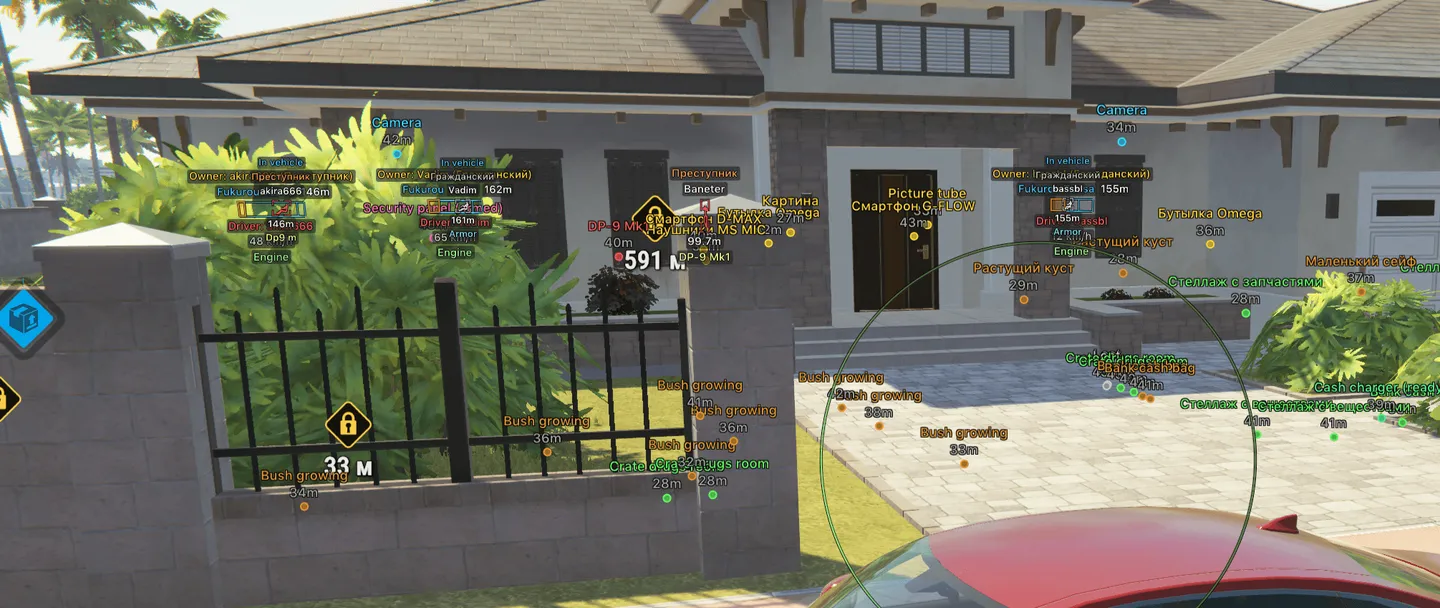
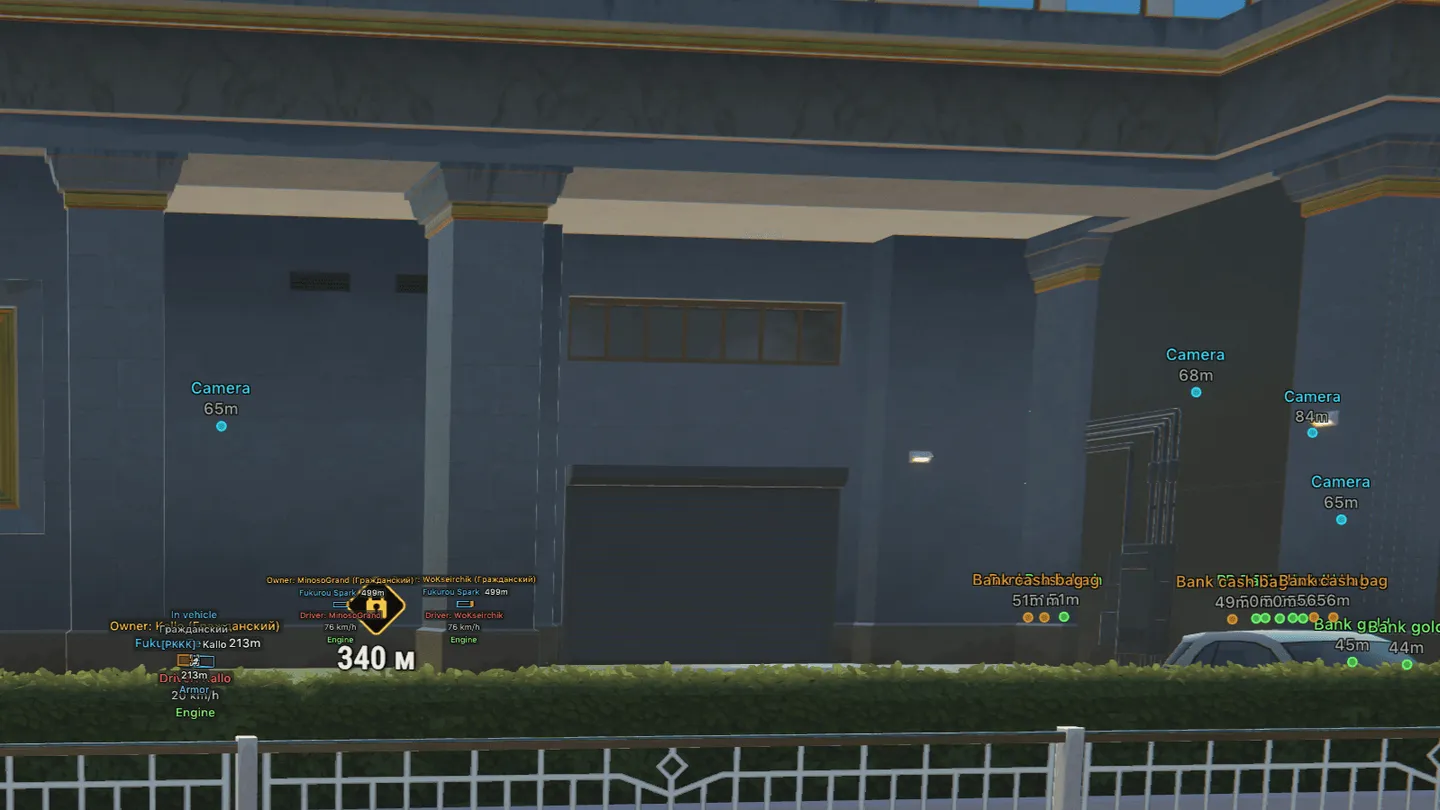
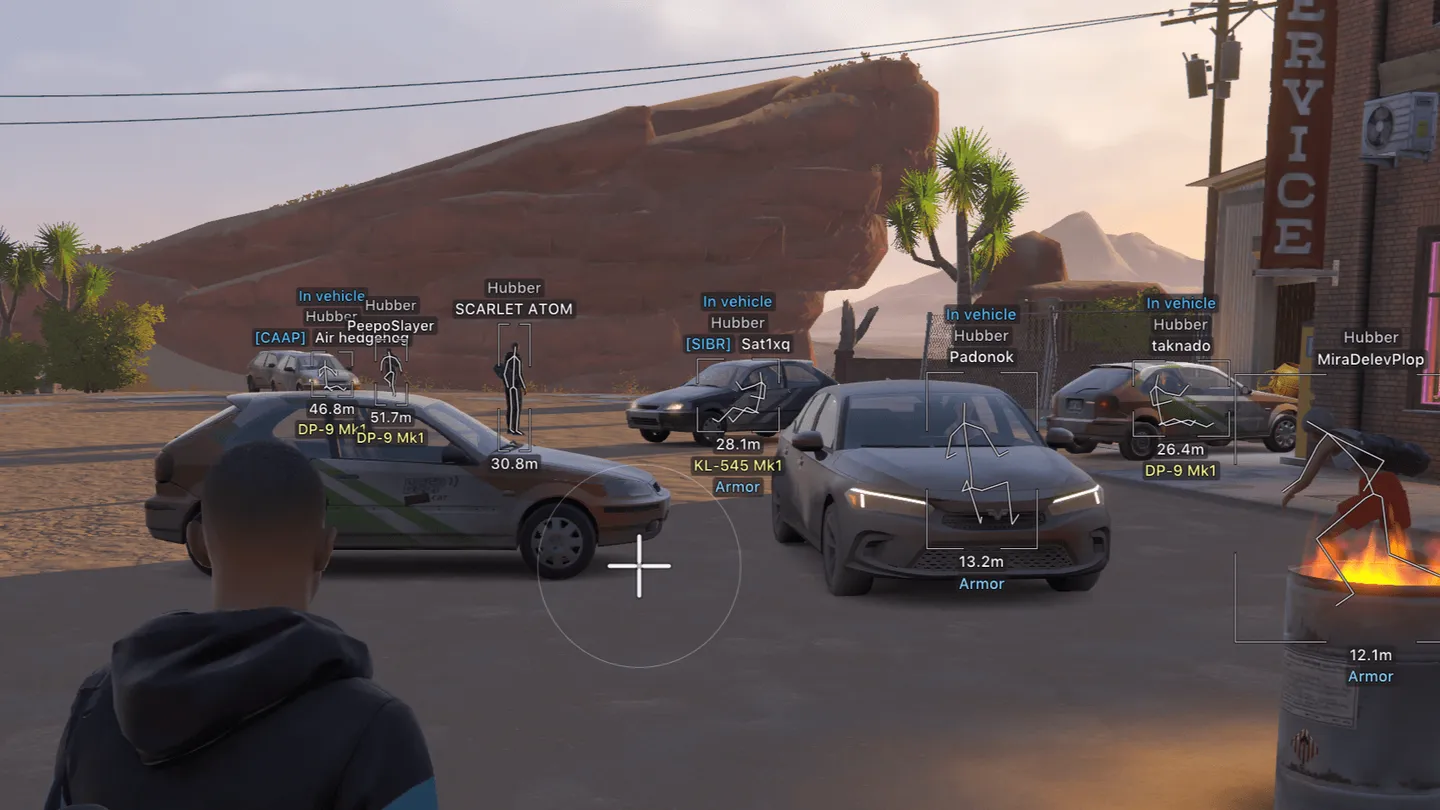
Arcane's ROB RUN ESP lets you tell a cop from a civilian before closing the distance: labels reveal roles, held weapons and armor, while vehicle markers identify the owner and driver. That information helps when deciding whom to follow or which vehicle to approach. Camera view zones and loot filters cover the approach to a target, with separate aimbot settings for each weapon category once shooting starts. Battle Mode clears the overlay. It can hide the radar and off-screen markers too, so choose what information to keep before switching it on.
Status:
undetected
- Windows
- 10(all)/11(all)
- Processor
- All
- Graphics card
- All
- Launchers
- Steam
- HWID Spoofer
- No built-in/Choose spoofer
List of Hack Features
87 features in 12 groupsAimbot
- Separate profiles for Global, Pistol, Automatic and Other weapon categories
- Enable aiming assistance, assign its key and use a force-aim key
- Aim while scoped, retain the current target and shift aim toward the head
- Limit target distance and set the delay before switching targets
- Adjust the humanization factor and aiming smoothness
- Set the silent aim hit chance
- Exclude dead, knocked or in-vehicle targets
- Select target categories, including cops, robbers, civilians and NPCs
- Choose specific target bones or use the closest bone; options include head, neck, body and pelvis
- Activate while holding the key or keep aiming assistance active
- Tune prediction strength and display a prediction cross with adjustable size
- Set FOV size or use adaptive FOV
- Draw the FOV outline and background, adjust border thickness and mark the locked target
Player ESP
- Configure cops, robbers and civilians as separate categories
- Enable the overlay, preview it in the menu and set its maximum distance
- Show labels with or without a background
- Choose 2D, 3D, box or corner outlines and adjust their width and height
- Fill boxes with a solid color or a gradient
- Draw skeletons, adjust line thickness, add a head circle and fade them with distance
- Draw lines to players with selectable color and origin
- Hide dead players, teammates or knocked players
- Use separate box and skeleton colors for teammates, knocked players and players in vehicles
- Apply Chams in the Glow section with a choice of material, including green, red, blue, purple, orange, white, neon and LED, and set separate colors for cops, robbers and others
- Display name, clan tag, role and held item
- Show icons of weapons and other held items; the name stays as text when no fitting icon exists
- Show health, armor, state, distance and player ID
- Display carried cargo and accumulated points when this data is available
- Mark whether a player is inside a vehicle
- Toggle the indicator of the player's current interaction and show action timers counting down to the end of the active action
NPC ESP
- Enable NPC markers and preview their appearance
- Choose labels with or without a background and limit their distance
- Filter out dead NPCs
- Use 2D, 3D, box or corner outlines
- Display the NPC's name, state and distance
Vehicle ESP
- Enable vehicle markers, choose label backgrounds and set the distance limit
- Show only occupied vehicles or hide your own vehicle and the one you are riding in
- Choose 2D, 3D, box or corner outlines
- Highlight and fill the front face of the vehicle box
- Apply solid or gradient box fill
- Draw lines to vehicles with selectable color and origin
- Display vehicle name, owner, driver, speed, status and distance
Camera ESP
- Enable camera markers with a distance limit and distance labels
- Hide broken cameras
- Assign different colors to normal, broken and alarmed cameras
- Display camera view zones and optionally fill their sectors
Item ESP
- Enable item markers, limit their range and show distances
- Hide empty objects
- Filter object types, including loot, loot nodes, cargo and cash chargers
- Use separate labels and filters for event containers and money delivery containers
- Filter loot categories, including weapons, ammunition, armor and equipment
- Locate safes, bank cash bags and bank gold bars
- Read security-panel state labels, including the armed state
- Show every base of the settlement on the map from any distance in the Bases tab
- Display base owner, clan, buildings and outbuildings; mark your own base and clan bases in their own colors
- Show base state: locked, under construction or moving
- Show raid state, including armed defense blocks, raided buildings, raid lock timer and VIP
- Inspect defense blocks of the main building, wall and outbuildings with installed modules, raid state, raid lock timer and open doors
- Display workbenches, including money laundering, cargo opening, cargo exchange, production, charging and crypto farm, with status, cargo inside and timers
- Show whether storages and containers are full or empty
- Show known lock states of containers and the name and icon of the item needed to open them
- Mark building loot left at the buildings
- Preview container contents in test mode, with "Content unknown" shown when the item list is unavailable
- Open the bases list with every base of the settlement, its distance and raid state
- Adjust transparency of base info
Radar
- Enable the radar, add distance rings and show the FOV cone
- Adjust zoom, size and transparency; scale markers by distance
- Choose entity types, including cops, robbers, civilians and NPCs
- Limit radar range and show distant entities on its rim
Off-screen markers
- Enable indicators for targets outside the screen
- Adjust indicator range and size, and limit target distance
Weapon control
- Remove weapon recoil
- Remove weapon sway
- Remove shot spread
- Apply skins in the Skin Changer tab, visible only to you
Battle Mode
- Assign a key to switch Battle Mode and display its indicator
- Use compact information display
- Hide dead entities, the radar or off-screen markers
- Hide selected categories, including cops, robbers, other entities and vehicles
Menu settings
- Assign menu and unload keys
- Choose DPI scale: 100%, 125% or 150%
- Toggle VSync and set the FPS limit
- Choose the Murky or Sunny theme and toggle the watermark
- Adjust clouds, cloud shadows and their movement speed
- Arrange the menu in one or two columns
- Select English, Russian or Chinese
Configurations
- Create a configuration and load saved settings
- Save changes, rename configurations and remove unwanted ones


