


Ghost Full for ROB RUN
1 / 16
How to install and launch
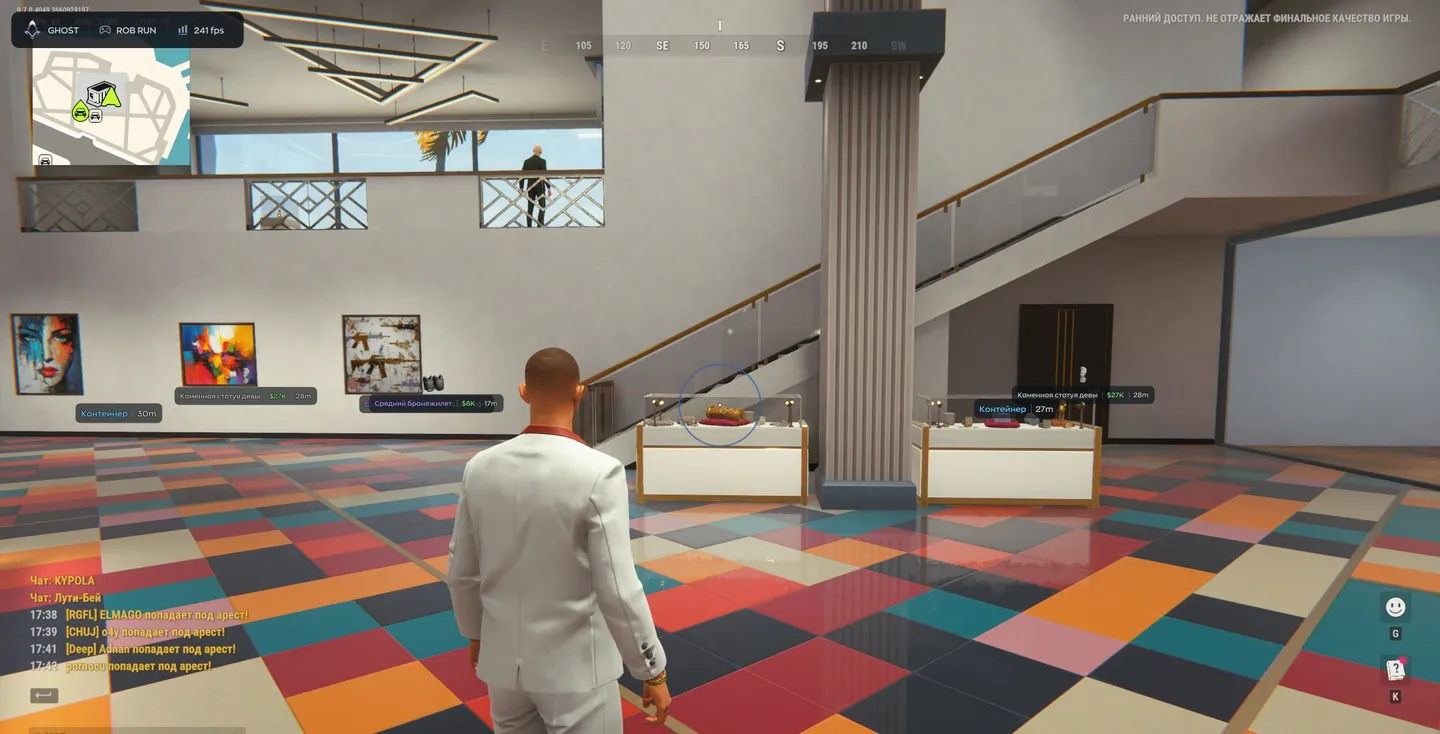
Ghost Full for ROB RUN marks players behind cover with their role, armor and weapon. Radar shows where they’re looking. In a firefight, prediction leads moving targets, and Target Lock can keep a target selected after it leaves the chosen aim area. The aimbot has three modes (Mouse, Silent and Memory). Loot markers show what each item is worth and how far away it is.
Status:
undetected
- Windows
- 101903+/11≤26H1
- Processor
- All
- Graphics card
- Nvidia/AMD
- Launchers
- Steam
- HWID Spoofer
- No built-in/Choose spoofer
List of Hack Features
106 features in 12 groupsAimbot
- Enable — toggles automatic aiming.
- Aim Method — choose Mouse, Silent, or Memory.
- Hitbox — pick the body part to aim at.
- Random Bone — pick a random one of the selected bones to aim at while shooting.
- Target Priority — choose which target takes precedence.
- Field of View — set the search area around your crosshair.
- Smoothness — adjust how gradually the crosshair moves toward a target.
- Target Lock — keeps the selected target after it leaves the aim field of view.
- Prediction — leads a target based on its movement.
- Team Check — skip allies, friends, and members of your own faction (for example, a police officer won't aim at fellow police) when selecting targets.
- Visibility Check — aim only at targets that are visible.
- Ignore Knocked — skip knocked-out players when selecting targets.
- Ignore Peaceful — skip peaceful players when selecting targets.
- Max Distance — cap the distance for automatic aiming.
- Shake — adds small movements to the crosshair as it tracks.
- Dead Zone — set the area around a target where aim corrections pause.
- Min Reaction / Max Reaction — set the window for the initial aim delay.
- Max Speed — cap how fast the camera can turn.
- Preview — inspect aim points on a character model.
Additional Aim Settings
- Hit Chance — control how often the aimbot deliberately misses.
- Line to Target — connect the crosshair and selected target with a line.
- Show Target — highlight the current Silent Aim target on screen.
- Tracers — draw visual tracers for shots.
- No Visual Recoil — remove visual weapon recoil.
- No Recoil Strength — adjust how strongly recoil is reduced, from 0 to 100%.
- No Camera Kick — remove camera shake when firing.
- No Visual Spread — keep the crosshair from expanding while shooting.
Player ESP
- Box — frame each player on screen.
- Chams — shade the character model in one of 14 styles, including Fill, Wireframe, Fill + Wireframe, and Fresnel.
- Skeleton — trace the pose of a player's body and limbs.
- Visibility Check — show whether Police, Peaceful, and Bandit players are visible on skeletons, boxes, and chams.
- Name — label players with their in-game names.
- Distance — add a range readout to each player marker.
- Weapon — show the weapon the player is carrying.
- Role — label each player by their in-game role.
- Armor — show whether a player has armor and its level.
- In Vehicle — show players who are inside vehicles.
- Clan Tag — show the player's clan or group tag.
- Line — draw a tracer from the edge of the screen to the player.
- Off Screen Arrows — point arrows toward players outside the screen.
- View Direction — add a line pointing where the player faces.
- Background — add a background behind ESP visual elements.
- Preview — check how your player markers look on a model.
Player Filters and Labels
- Show Factions — show only the factions you select.
- Weapon Display — choose an icon or a text label.
- Ignore Clan — exclude players with the specified clan tags.
Radar
- View Direction — show where players are looking on the radar.
- Outline and Background — toggle the radar border and background.
- Size — change how much screen space the radar takes up.
- Dot Style and Dot Size — pick the shape and size of player markers.
- Max Distance and Zoom — set player range and map scale independently.
- Filters — show Peaceful, Police, or Bandit players on the radar.
- Preview — check the layout of player dots and direction markers.
- World Map — view players, vehicles, and labels on a full map of the world.
- Minimap Radar — show players on the in-game minimap.
Loot ESP
- Categories — weapons, ammo, armor, medical supplies, keys, valuables, grenades, and other items.
- Icons — use item symbols in place of text.
- Filter — search by item name and see its price in the results.
- Hide All / Show All — toggle every item in the loot filter at once.
- Loot labels — see prices and distances beside items in the game view.
- Summary — view detected loot in a separate list.
- Take All by Filter — automatically pick up revealed container loot by category and minimum value, accounting for free inventory space and waiting for each item to transfer.
Vehicles
- Box — outline vehicles with a frame.
- 3D Box — outline vehicles with a three-dimensional frame.
- Text — show the vehicle name alongside its distance.
- Vehicle Info — show the owner's name, cargo, speed, and movement status.
- Text Style — set the color, font size, and background for each vehicle text element.
- Vehicle Profiles — set vehicle display separately for Bandits, Police, Peaceful, and Empty vehicles.
- Vehicle Summary — view vehicles in a separate list with type, distance, owner, passenger count, and cargo.
Friends
- Friends list — in the Misc tab, find players by nickname, add or remove them, and see their distance in the list.
World Objects
- Containers — mark containers in the game view, hiding empty ones.
- Instant Search — reveal container contents instantly.
- Bags — give bags their own markers.
- Cargo — label cargo in the surrounding area, picking cargo groups from a drop-down list.
- Loot Spots — mark positions where loot spawns, hiding empty ones.
- Loot Filters — choose container types and loot spot categories in separate multi-selects.
- Cash — mark money dropped on the ground.
- Cameras — see the locations of surveillance cameras.
- Camera Status — show whether each camera is Active, Alarm, Hacked, or Broken.
- Bush ESP — show each plant's status, rarity, count, and distance, with color highlighting of status and rarity and adjustable name color, range, and font size.
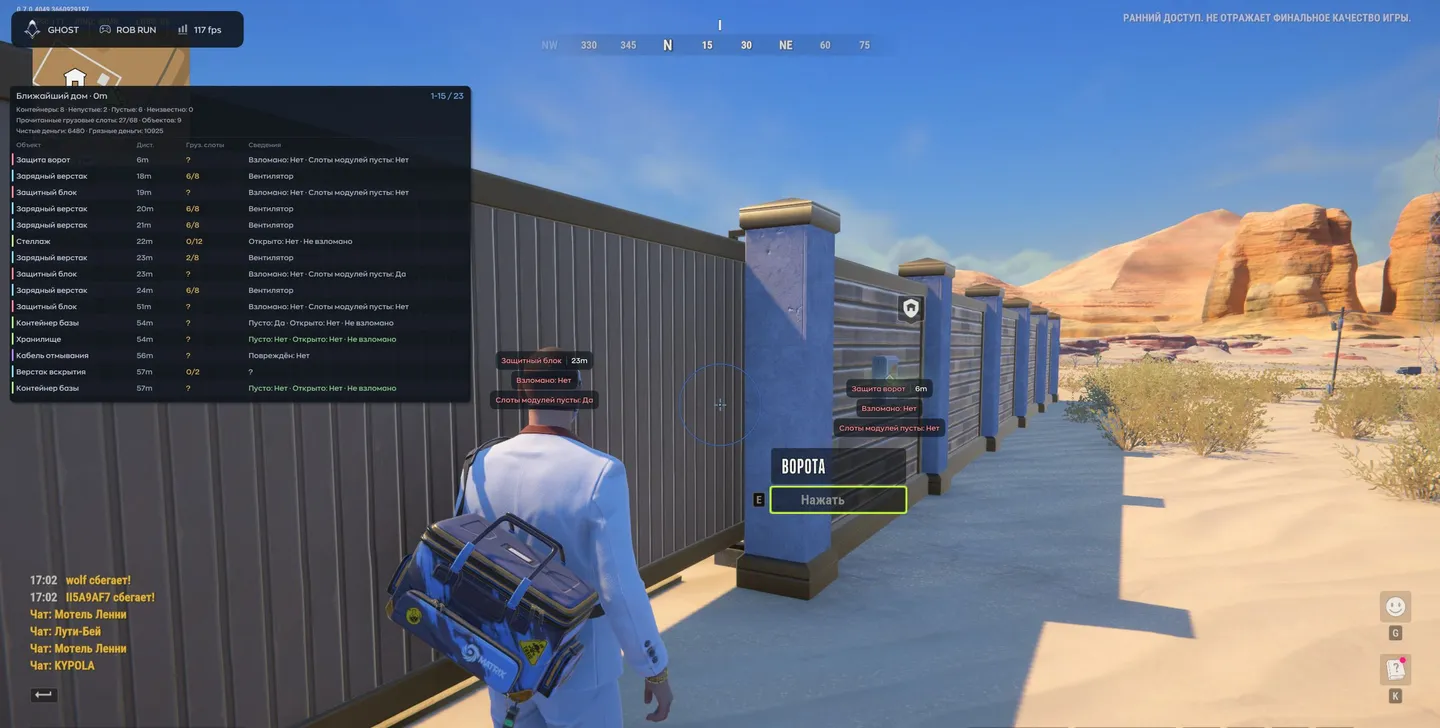
- Base ESP — mark defense blocks, storages, shelves, workbenches, money laundering, crypto farms, collection tables, and cables, with available object states, cargo slots, upgrades, and timers.
- Base Object Settings — set the color, distance, and font size for each base object category.
- Nearest House Summary — list the house's objects with distances, cargo slots, detailed states, empty and non-empty container counts, and available clean and dirty money data; works independently of ESP labels and wraps long details.
AI Chat
- AI Assistant — ask questions about Ghost's features and menu in the built-in chat.
Configs
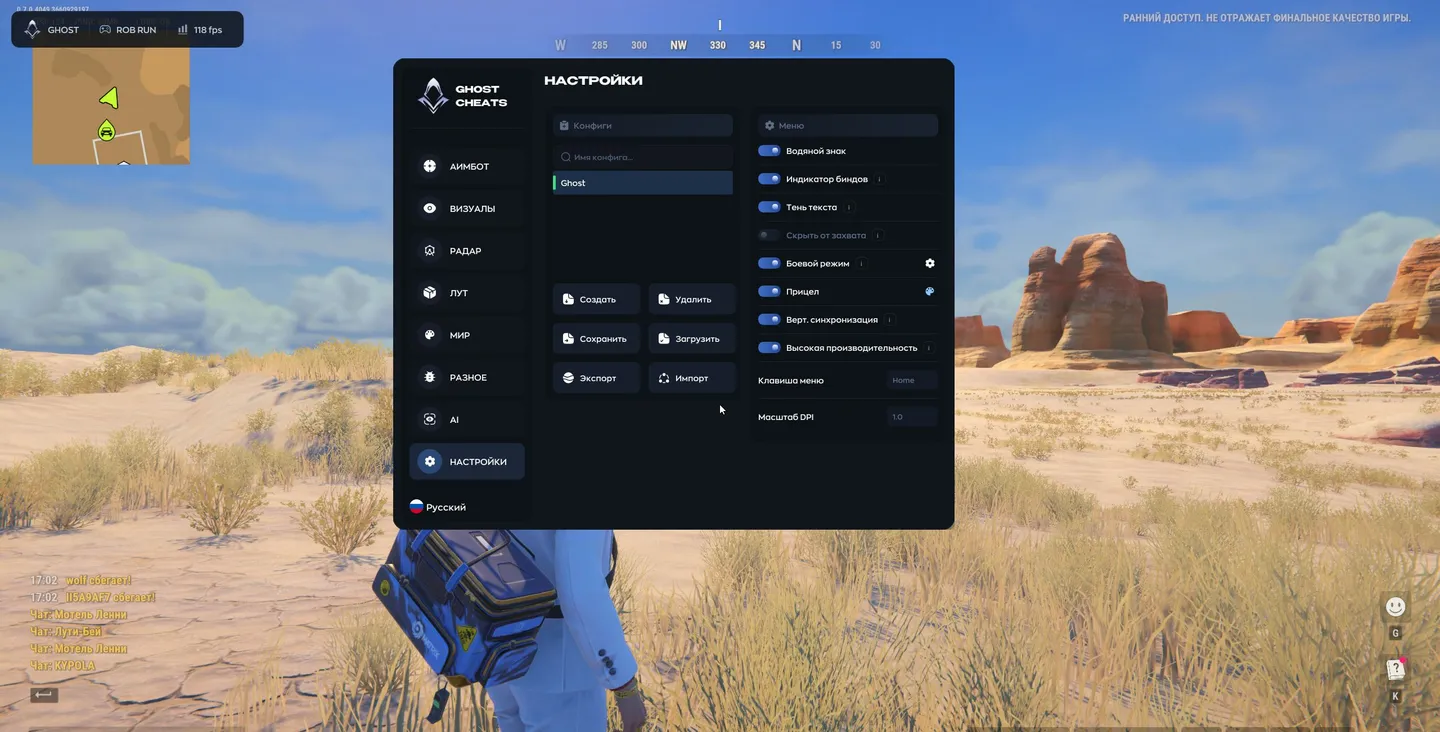
- Create / Delete — manage profiles in the config list.
- Save / Load — store your current settings in a profile or recall a saved profile.
- Export / Import — move profiles using config files.
- Profiles — switch between Peaceful, Police, and Bandit profiles, each with its own settings.
Menu Settings
- Watermark — show the Ghost logo in the game view.
- Binds Indicator — show which bound keys are pressed.
- Text Shadow — apply shadows to interface labels.
- Hide from Capture — exclude the menu from screenshots and streams.
- Combat Mode — hide the menu with a hotkey.
- Crosshair — enable a custom reticle.
- No Fog — disable all fog layers.
- Anti-Flash — protect your view from flashbang grenades.
- Custom Sky Color — replace the sky color.
- Debug Camera — move the camera freely to look around.
- V-Sync — toggle vertical sync.
- High Performance — reduce the menu's rendering load.
- Menu Key — set which key opens and closes the menu.
- DPI Scale — resize menu elements.
- Trace Cleaner — at launch, offers a full PC cleanup so a new account is not linked to a previously banned one.
- SkinChanger — apply skins to weapons, characters, masks, bags, and charms.
- Appearance Menu — pick skins from image cards with animations and a mark on the selected skin.
- Weapon Gallery — see the installed skin on each weapon card and click it to open its variants.
More Hacks for ROB RUN

Ancientfrom 3$
Aimbot, ESP, Radar
undetected

Stealthfrom 3.65$
Aimbot, ESP, Radar
undetected

Arcanefrom 4$
Aimbot, ESP, Radar
undetected

Ghost ESPfrom 2.43$
Aimbot, ESP, Radar
undetected

Vengeancefrom 4.05$
Aimbot, ESP, Radar
undetected

Mason Internalfrom 3.64$
Aimbot, ESP, Radar
undetected

UDPfrom 3$
Aimbot, ESP, Radar
undetected