


Stealth for Apex Legends
How to install and launch
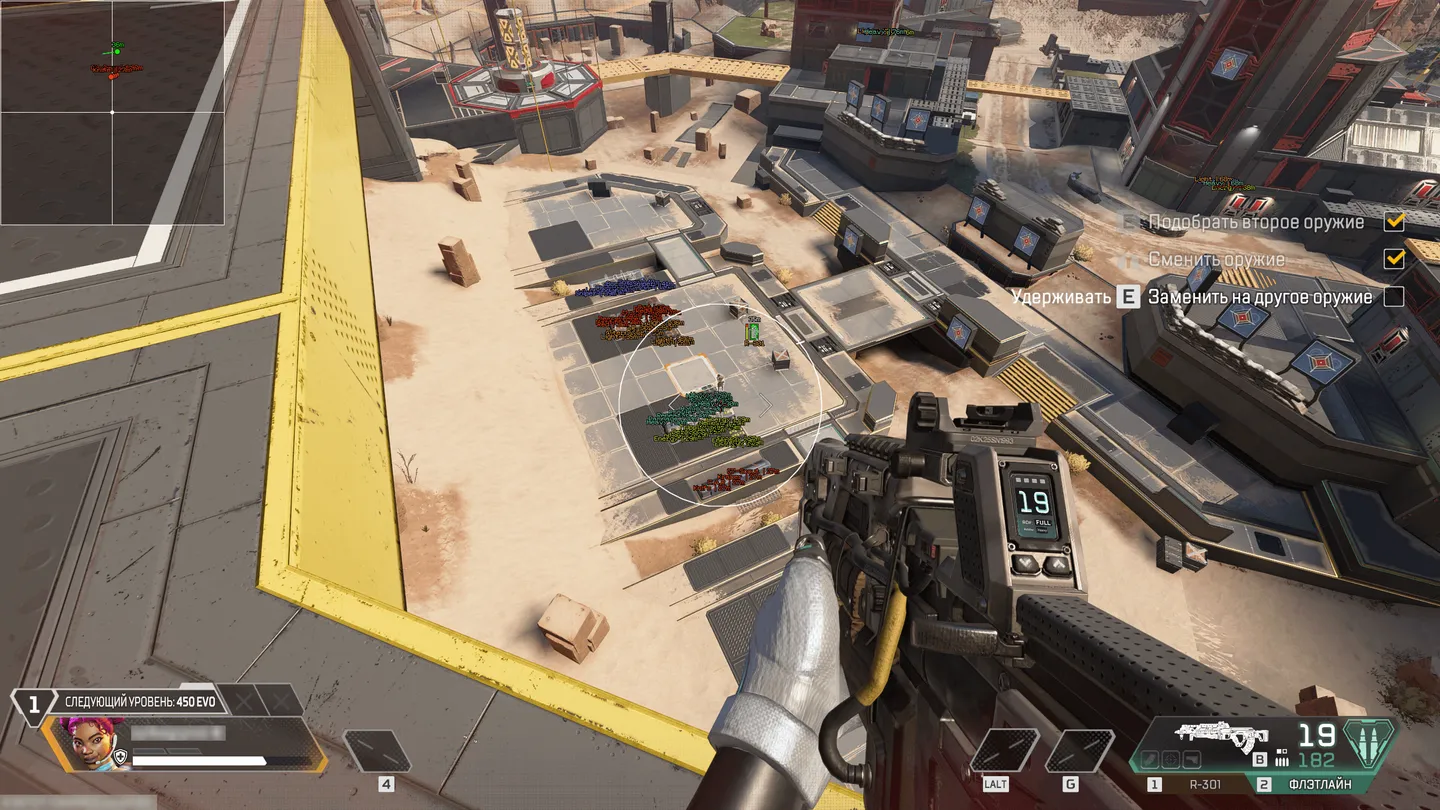
Stealth for Apex Legends combines a wallhack that distinguishes visible, hidden and knocked players with an aimbot for aiming assistance. Player ESP shows health, held weapons, skeletons and hitboxes, so you can assess a target before engaging. Set separate ESP ranges for players, loot and bodies, up to 1,000 m each, to keep distant enemies marked without filling the screen with item labels. Loot filters narrow the display by item type and minimum rarity.
For aiming, bind the aimbot to a key and choose the head, chest or pelvis as the aim point. You can adjust its speed, acquisition FOV and range up to 600 m, add aim inaccuracy, restrict it to visible targets or skip knocked players. The 2D radar provides a separate view of player positions and facing directions alongside named loot markers and distances. Its range stops at 400 m.
- Windows
- 10(all)/1123H2–26H2
- Processor
- All
- Graphics card
- All
- Launchers
- Steam, EA App
- HWID Spoofer
- No built-in/Choose spoofer
List of Hack Features
55 features in 7 groupsPlayer ESP
- Box – Places a 2D frame around each player
- Name – Labels the player with their nickname
- Health – Displays the player's remaining health
- Weapon – Labels the weapon the player is holding
- Skeleton – Traces the player's pose with bone lines
- Hitbox – Shows the player's hitboxes
- Distance – Adds a range label to each player
- Distance Limit – Sets the cutoff for player ESP from 0 to 1,000 m
Aimbot
- Active – Switches aim assistance on or off
- Bind key – Sets the key that activates aiming, such as RButton
- Visible check – Restricts aiming to targets in view
- Ignore knocked – Excludes players who are downed
- Aimbot Bone – Picks the head, chest or pelvis as the aim point
- Working FOV – Sets the angle within which the aimbot can acquire targets
- Aimbot speed – Sets how quickly the crosshair moves toward a target (1–10)
- Aimbot inaccuracy – Adds deliberate variation to the aim point
- Working distance – Sets the maximum range for target acquisition (0–600 m)
- Draw FOV – Shows the aiming area as a circle
- Draw target – Marks the current target
- Draw crosshair – Adds a fixed crosshair to the screen
Loot ESP
- Weapons – Marks weapons on the ground
- Ammo – Marks ammunition pickups
- Heal – Marks healing items
- Equipment – Marks armor and clothing
- Grenades – Marks throwable explosives
- Attachment – Marks weapon attachments
- Minimum LVL – Hides loot below the chosen rarity
- Distance – Labels each item with its distance
- Distance Limit – Sets the cutoff for loot ESP from 0 to 1,000 m
Corpse ESP
- Corpse – Marks where eliminated players fell
- Distance – Shows how far away each body is
- Distance Limit – Sets the cutoff for corpse markers from 0 to 1,000 m
2D Radar
- Active – Turns the radar window on or off
- Show players – Plots player positions on the radar
- Player names – Labels player markers with nicknames
- Player direction – Shows which way each marked player is facing
- Player Distance – Adds distance to player markers
- Show loot – Plots items on the radar
- Loot name – Labels item markers by name
- Loot distance – Shows the range to marked items
- Loot minimum LVL – Filters radar items by minimum rarity
- Size – Adjusts the radar window from 50 to 200 px
- Draw distance – Sets the radar radius from 50 to 400 m
Colors
- Box visible – Sets the RGB color of frames around visible players
- Box invisible – Sets the frame color for players behind cover
- Box knocked – Sets the frame color for downed players
- Skeleton – Changes the color of bone lines
- Corpse – Changes the color of corpse markers
- Aimbot visuals – Sets the color of the FOV circle, crosshair and target marker
- Hitbox alpha – Adjusts hitbox opacity from 0 to 255
Settings
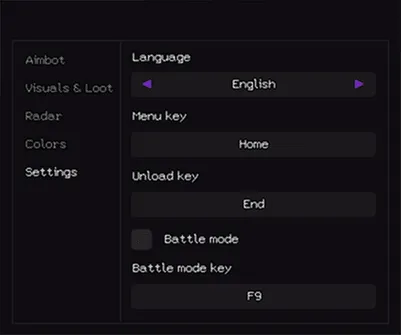
- Language – Switches the menu between English and Russian
- Menu key – Assigns the menu hotkey, shown as Home in the screenshot
- Unload key – Assigns the hotkey that unloads Stealth, shown as End
- Battle mode – Switches to a separate combat configuration
- Battle mode key – Assigns the combat mode hotkey, shown as F9


